

What if a dashboard message in a rented supercar is a routine service reminder, not a sign the car is about to fail? Understanding manufacturer scheduled service indicators on rented supercars starts with treating the message as information to verify, not permission to ignore or reset it. If the display is unfamiliar, check the exact wording and the vehicle’s instructions before deciding what to do.
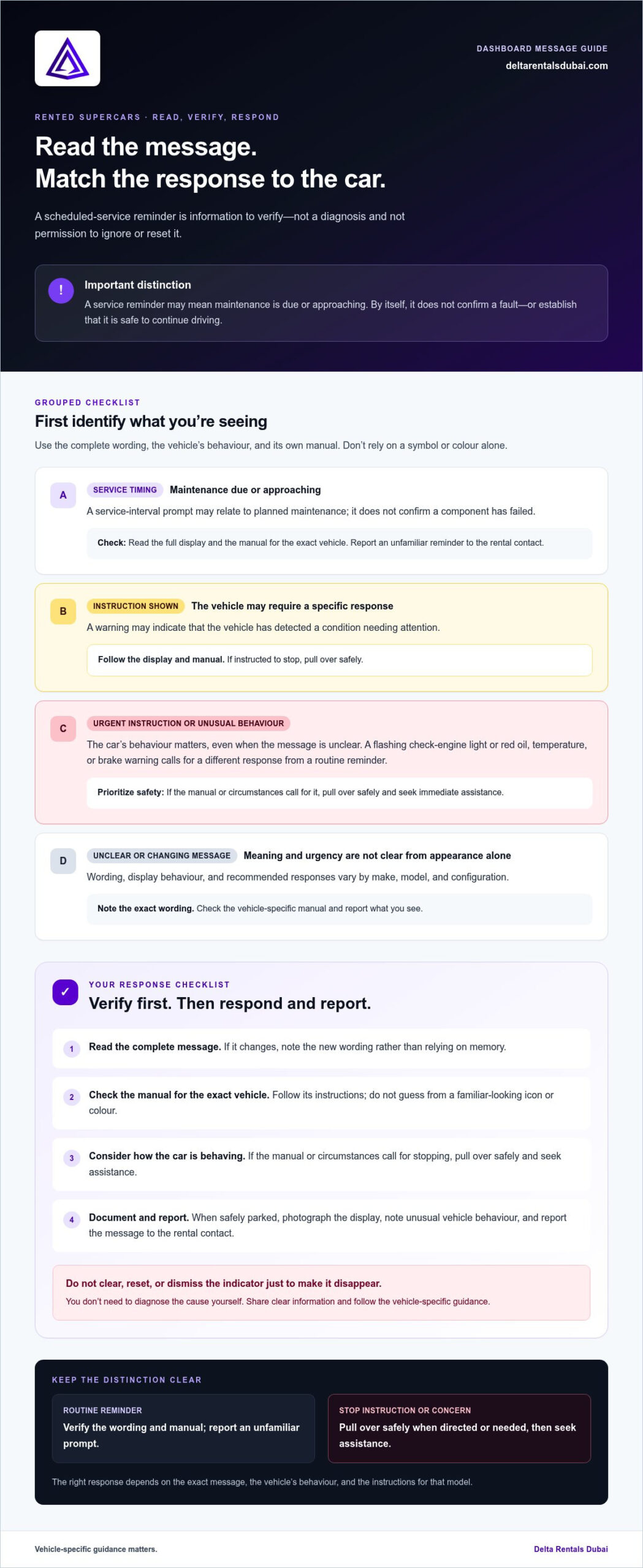
A scheduled-service reminder usually signals that maintenance is due or approaching. It is not the same as a fault warning that calls for immediate attention. The exact message and urgency vary by model. A flashing check-engine light or a red oil, temperature, or brake warning calls for a different response: pull over safely and seek immediate assistance.
This guide explains how to distinguish a routine reminder from a warning, what to do if a message appears during your rental, and how to report it clearly. Photograph the display only when safely parked, note the exact wording and any unusual vehicle behaviour, and report the message to the rental contact. Don’t try to clear it yourself. These steps can help you enjoy a car such as the Porsche 911 GT3 RS or McLaren Artura with greater confidence.
Key Takeaways
- A scheduled-service message alone doesn’t confirm a fault or establish that the car is safe to drive.
- Use the full message, the vehicle’s behaviour, and its manual to decide what to do. Stop safely and seek assistance if the instructions or circumstances call for it.
- Understanding manufacturer scheduled service indicators on rented supercars means responding calmly, without resetting the display or attempting repairs.
- Record dashboard messages at handover and during your rental to keep a clear account of what appeared and when.
- Follow the vehicle-specific manual and report concerns through the rental contact.
What manufacturer scheduled-service indicators mean in a rented supercar
A scheduled-service indicator is a dashboard message connected to maintenance timing or a service interval. It may appear when the vehicle reaches a set mileage or time point, but its presence alone doesn’t establish that a component has failed. It also can’t tell you, by itself, whether it’s safe to continue driving.
That distinction matters in a rental. A maintenance prompt can relate to planned servicing, while a fault warning may signal a condition the vehicle has detected and needs attention. Wording, display behaviour, and the recommended response differ across manufacturers, models, and vehicle configurations. Don’t assume a familiar-looking symbol or colour means the same thing in every car.
Before interpreting a dashboard message, check the manual for the exact vehicle you’re driving. The display’s appearance alone isn’t a reliable guide to its meaning. Understanding manufacturer scheduled service indicators on rented supercars starts with verifying the message and following the vehicle-specific instructions.
Scheduled-service reminder or fault warning: what is the difference?
A scheduled-service reminder generally points to maintenance timing or an interval. A fault warning, by contrast, may report that the vehicle has detected a condition requiring attention. That’s a general distinction, not a universal decoding rule. A phrase, icon, colour, or steady versus changing display can’t be interpreted safely without the vehicle’s own guidance. Read the complete message and consult the manual rather than guessing from its appearance. If the message indicates an urgent issue or the car behaves unusually, follow the manual’s instructions and report it through the rental contact.
Why supercar indicators can be model-specific
Performance cars can use different dashboard layouts and manufacturer terminology. A Porsche 911 GT3 RS and a McLaren Artura are distinct models, so a message in one shouldn’t be assumed to mean the same thing in the other. Equipment and configuration can also affect what appears on the display. At handover, familiarize yourself with the vehicle’s screens and where its manual explains dashboard messages. This makes it easier to respond accurately if an unfamiliar indicator appears during your drive.
When checking the manual, use the exact wording on the display. If the message changes, note the new wording rather than relying on memory. You don’t need to diagnose the cause yourself. Your aim is to understand the vehicle’s instructions and share clear information with the rental contact. Don’t reset or dismiss an indicator just to make it disappear. Follow the model-specific guidance and consider both the message and the car’s behaviour when deciding what to do.
How to tell a routine service reminder from a warning that needs attention
Start with the complete message, not just the icon. A prompt about a service interval may relate to planned maintenance, while a warning may describe a condition the vehicle has detected. The colour or shape of a symbol doesn’t tell the whole story across every make and model.
| Message type | What it may indicate | Sensible next action |
|---|---|---|
| Service timing or interval prompt | Maintenance is due or approaching; it doesn’t confirm a fault by itself. | Read the full display and manual, then report an unfamiliar reminder to the rental contact. |
| Warning with an instruction | The vehicle may have detected a condition that needs a specific response. | Follow the displayed instruction and the manual. If directed to stop, pull over safely. |
| Message alongside unusual behaviour | The car’s behaviour may indicate an issue, even if the message is unclear. | Stop in a safe place if needed and contact the rental contact for guidance. |
| Unclear or changing message | The cause and urgency can’t be determined from appearance alone. | Note the exact wording, check the manual, and report what you see. |
A routine reminder may call for a report and guidance. If a warning explicitly tells you to stop, pull over safely and follow that instruction. The right response depends on the exact message, how the vehicle is behaving, and what the vehicle-specific manual says. Don’t use the table instead of those instructions.
Clues that a message is a scheduled maintenance prompt
Wording that refers to service timing or an interval can suggest planned maintenance rather than a confirmed diagnosis. Check the full display for accompanying instructions, then consult the manual for that vehicle. If you’re unsure how to classify the message, report it instead of deciding it’s harmless. Keep a note or photo of the wording so you can describe it accurately.
Signs the message may require an immediate response
Give priority to explicit directions such as stop, pull over safely, or avoid continued driving. If the vehicle behaves abnormally or the manual directs you to stop, find a safe place to pull over and contact the rental contact. Don’t infer urgency from a red or amber symbol alone, as display conventions differ. The vehicle’s instructions and behaviour matter more than a colour-based guess.
This measured approach helps you understand manufacturer scheduled service indicators on rented supercars without turning a reminder into a diagnosis. Read, verify, and report. Don’t reset the display or attempt repairs. Clear communication helps keep the next step straightforward. You can discuss a supercar rental and keep the vehicle-specific instructions central to your drive.
What to do if a service indicator appears while renting
A dashboard message can be unsettling in an unfamiliar car, but a clear sequence helps you respond without guessing. Keep your attention on driving first. If the vehicle is moving, don’t use your phone or search menus. Find a safe place to stop before reading the display, consulting the manual, or taking a photo. Understanding manufacturer scheduled service indicators on rented supercars means treating the message as information to verify and report, not something to dismiss or fix yourself.
A simple safe-response sequence for renters
- Read the full message. Once safely stopped, note the exact wording and whether the display includes an instruction. Don’t rely on a partial phrase or a symbol alone.
- Assess the vehicle’s behaviour. Notice whether it feels, sounds, or responds differently. Don’t continue driving if the car behaves abnormally.
- Follow the vehicle manual. Check the guidance for that specific model. If it directs you to stop or avoid driving, follow that instruction and pull over safely if you haven’t already.
- Notify the rental contact. Share the message, how the vehicle is behaving, and where you are. Follow the instructions you receive for the next step.
Report warning messages and abnormal vehicle behaviour promptly. Don’t ignore a warning, attempt a repair, or reset an indicator without authorization, even if the car seems to be driving normally. Clearing the display doesn’t establish what caused the message or whether the vehicle needs attention.
What information to share when reporting the message
Give a clear, factual account. Record the exact dashboard wording and, only while parked safely, take a photo that shows it legibly. Note when it appeared, such as after starting the car or during the drive, and describe any change in sound, response, or handling. If the vehicle seems normal, say so. Avoid diagnosing the cause or presenting a guess as fact.
Before taking any action beyond following the manual’s immediate instructions, wait for guidance from the rental contact. Keep your report focused: identify the message, explain the circumstances, and describe the vehicle’s behaviour. If the display changes or another warning appears, share the new information. Don’t make a repair, disconnect anything, or use dashboard controls to clear or reset the indicator unless you’re specifically authorized to do so.
A careful handoff helps keep decisions clear for both renter and rental provider. Stay focused on safety, preserve the information shown on the display, and follow the model-specific instructions rather than relying on assumptions. A prompt, accurate report is a responsible part of enjoying a rented supercar.
How to handle service indicators at handover and during the rental
A dashboard message can be easy to miss while you’re getting familiar with an unfamiliar car. Check for one before setting off so you and the handover representative have a clear starting point. If an indicator is already visible, record it and report it through the rental provider’s normal process. This creates a useful shared record, but doesn’t diagnose the cause or determine responsibility.
If an indicator is already displayed at handover
Pause before departure and follow the handover process. Note the exact wording and how the message appears, then review it with the representative using the vehicle-specific information available, such as the relevant manual guidance. Avoid guessing what caused it or trying to clear it. Make sure the observation is recorded through the handover process before setting off.
- Capture the full wording, not just the symbol or a partial phrase.
- If taking a photo, do so while safely parked and make sure the display is readable.
- Find the vehicle-specific guidance for that message.
- Confirm that the observation has been noted through the handover process.
This practical record supports clear communication later. It isn’t a conclusion about the vehicle’s condition, a promise about what the message means, or an interpretation of rental terms.
If the indicator appears after you begin driving
Be precise about what you know. If you saw the display before departure but only noticed it later, say so. If you’re sure it appeared during the journey, share when and under what circumstances. Don’t present an uncertain timeline as fact. Report the message to the rental contact, along with any change in how the car felt or sounded, and follow the guidance you receive.
For a useful report, keep the details simple and factual:
- The exact dashboard wording and when you first noticed it.
- Whether the message was present at handover or appeared during the drive, as far as you can tell.
- Any unusual behaviour, sound, or change in the vehicle’s response.
- Any instructions shown on the display or in the vehicle-specific manual.
Don’t assume who is responsible for maintenance or whether a message affects charges. Those questions depend on the rental agreement and the provider’s guidance, not on the indicator alone. Documentation records what you observed; it doesn’t determine contractual responsibility. Understanding manufacturer scheduled service indicators on rented supercars includes respecting that boundary and reporting promptly without attempting a diagnosis, repair, or reset.
A considered handover sets the tone for a confident drive. If you’re planning a rental, message the team about renting a car and keep the vehicle-specific handover guidance close at hand.
Enjoy a rented supercar with confidence: understand, report, and keep driving decisions clear
Confidence doesn’t come from ignoring a dashboard prompt. It comes from knowing where to find the vehicle’s instructions, taking an unfamiliar message seriously, and communicating clearly. A simple routine helps you make considered decisions while enjoying a premium rental, whether you’re driving a Porsche 911 GT3 RS, a McLaren Artura, or another vehicle.
A quick checklist before and during your drive
- Read: At handover, familiarize yourself with the dashboard display and where to find the vehicle-specific instructions.
- Verify: If a message appears, read the full wording and assess how the vehicle is behaving. Don’t decide what a symbol means from its appearance alone.
- Document: Note the exact message and when you noticed it. Take a clear dashboard photo only when safely parked.
- Report: Share unfamiliar or concerning messages with the rental contact, including any change in the car’s sound or response.
- Follow: Use the vehicle manual and rental provider’s direction to guide your next step. Don’t reset an indicator or attempt a repair without authorization.
Keep this sequence simple. If the display gives an explicit instruction or the car behaves abnormally, prioritize the vehicle-specific guidance and safety. If you’re uncertain whether the message was already present at handover or appeared during the drive, say so plainly. An accurate account is more useful than a confident guess.
Make your next supercar rental feel informed and effortless
Understanding manufacturer scheduled service indicators on rented supercars is part of getting familiar with the car, not diagnosing it. A reminder may relate to planned maintenance, but it shouldn’t be dismissed or treated as proof of a fault. Read the message, check the manual, record what you observe, and report it. These habits support considerate driving and help keep decisions clear without assuming that a reminder can be cleared or resolved during your rental.
At handover, take a moment to understand the specific display and where its instructions are located. Familiarity with the vehicle’s dashboard can make an unfamiliar message easier to handle, whether you’re receiving a Porsche 911 GT3 RS or another premium rental from Delta Rentals Dubai. Stay attentive, communicate clearly, and let the car’s instructions guide your response.
If you’re considering a premium car rental, message Delta Rentals Dubai to discuss your rental.
Make your next drive a confident one
A little familiarity before you set off can make an unfamiliar supercar feel more intuitive. During handover, take time to understand the dashboard and where to find the vehicle-specific guidance. That preparation gives you a clear reference point if a message appears later, so you can respond thoughtfully instead of guessing.
Understanding manufacturer scheduled service indicators on rented supercars is part of being an informed, considerate driver. Treat the vehicle’s instructions with care, communicate clearly when something seems unusual, and let the rental provider guide the next step. The aim isn’t to interpret every system yourself. It’s to enjoy the drive while respecting the car and the rental process.
Ready to plan a premium drive? Discuss your next supercar rental on WhatsApp. Get familiar with your chosen car at handover, then enjoy the road with confidence.
Frequently Asked Questions
Does a scheduled-service indicator mean a rented supercar is unsafe to drive?
Not necessarily. The message alone doesn’t establish whether the car is safe or unsafe. Check the vehicle-specific manual and consider whether the car is behaving differently, such as losing power or making an unusual sound. If the display tells you to stop or the vehicle’s behaviour causes concern, pull over safely and follow its instructions. Understanding manufacturer scheduled service indicators on rented supercars means treating the message as a prompt to verify, not a verdict.
Can I reset a service indicator in a rental supercar?
Don’t reset it unless the rental provider explicitly authorizes you to do so. A reset can remove useful information from the display without addressing why the message appeared, and the control sequence may vary by model. A menu option you recognize from another car may serve a different purpose here. Leave the message visible, record its wording, and follow the provider’s guidance rather than exploring dashboard settings.
What should I do if a service message appears after I start driving?
Keep your attention on the road and don’t try to read or photograph the display while moving. If the car needs to stop, pull over somewhere safe first. Then note the message, check the vehicle’s instructions, and tell the rental contact when you noticed it and whether anything felt different. If you can’t tell whether it appeared during the drive or was already displayed, report that uncertainty honestly.
Can a service indicator appear even if the car seems to drive normally?
Yes. A message related to a maintenance schedule can appear without an obvious change in how the car feels, sounds, or responds. Normal driving behaviour doesn’t confirm what the message means or whether it can be disregarded. Read the full wording and consult the manual for that vehicle. Report an unfamiliar prompt to the rental contact, and don’t use apparently normal performance as a reason to clear or ignore it.
Should I take a photo of a dashboard service indicator?
Yes, a clear photo can help you share the exact display rather than relying on memory, provided you take it while safely parked. Include enough of the dashboard to show the message clearly, but don’t delay following an instruction that calls for immediate action. If photographing isn’t safe or practical, write down the wording and any accompanying instruction, then pass those details to the rental contact.
What is the difference between a service reminder and a fault warning?
A service reminder generally relates to planned maintenance timing, while a fault warning may indicate that the vehicle has detected a condition. The wording and urgency depend on the specific model, so don’t classify a message by colour or icon alone. Look for any accompanying direction, consult the vehicle’s manual, and consider how the car is behaving. An explicit instruction to stop requires a different response from a routine interval prompt.