
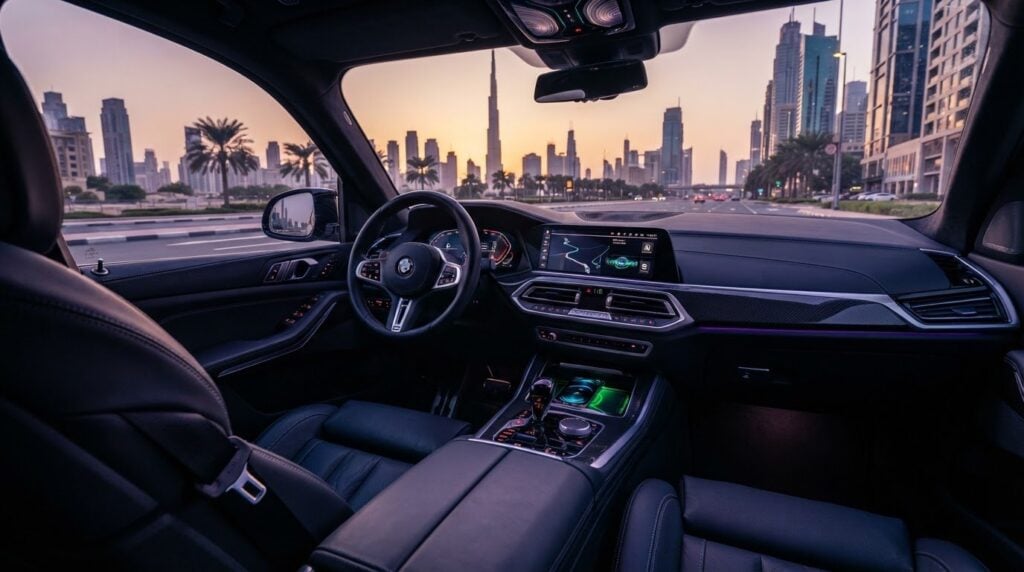
A twin-turbo V8 delivers pure adrenaline, but nothing stalls your momentum faster than spending twenty minutes trapped in a labyrinth of unfamiliar digital menus. Mastering smartphone connectivity and infotainment setup in luxury rental cars should feel as effortless as the drive itself. Yet moving between distinct exotic interfaces often leads to stubborn pairing bugs, frozen navigation, and wireless charging pads that turn your phone scorching hot before you even leave the driveway.
You shouldn’t have to battle confusing settings or worry about leaving your personal call logs and destinations behind in a prestige fleet. Cockpit tech exists to enhance the drive, not cause distraction or thermal throttling. In this 2026 guide, you’ll learn how to secure instant wireless Apple CarPlay and Android Auto pairing, optimize premium sound systems for studio-grade clarity, and prevent battery overheating on long drives. Read on for the exact protocol to streamline your digital cockpit and wipe your private data clean before handover.
Key Takeaways
- Mastering smartphone connectivity and infotainment setup in luxury rental cars before departure eliminates dangerous cockpit distractions and ensures fluid access to critical driving telemetry.
- Establish instant wireless Apple CarPlay and Android Auto projection by executing the correct dual-band Wi-Fi and Bluetooth handshake sequence on exotic vehicle platforms.
- Prevent severe thermal throttling and device shutdowns caused by high-demand wireless mirroring combined with enclosed inductive charging pads.
- Calibrate factory-flattened equalizer settings across benchmark acoustic systems like Burmester and Meridian to experience authentic studio-grade sound on the open road.
- Protect your sensitive digital footprint by completing a rapid data wipe protocol that clears contacts, call logs, and destination caches before handing the keys back.
Navigating Modern Luxury Infotainment: Why Setup Matters Before Departure
Settling behind the wheel of a high-performance machine demands complete focus. Modern prestige cockpits integrate telemetry, climate systems, and high-fidelity media into sophisticated digital architectures. Managing in-car entertainment systems while negotiating open highways in a 700-horsepower supercar is dangerous. Taking five minutes during handover to configure your digital cockpit ensures effortless command over navigation, media, and performance monitors from the first press of the throttle.
Mastering smartphone connectivity and infotainment setup in luxury rental cars eliminates operational friction before your tires hit the asphalt. Flagship platforms demand distinct pairing protocols compared to standard commuter vehicles. Skipping this calibration leaves you wrestling with unfamiliar digital layers when you should be enjoying the drive.
Proprietary Cockpit Systems: Porsche PCM, Pivi Pro, and Bespoke Interfaces
Exotic marques build distinct digital environments tailored to their performance DNA:
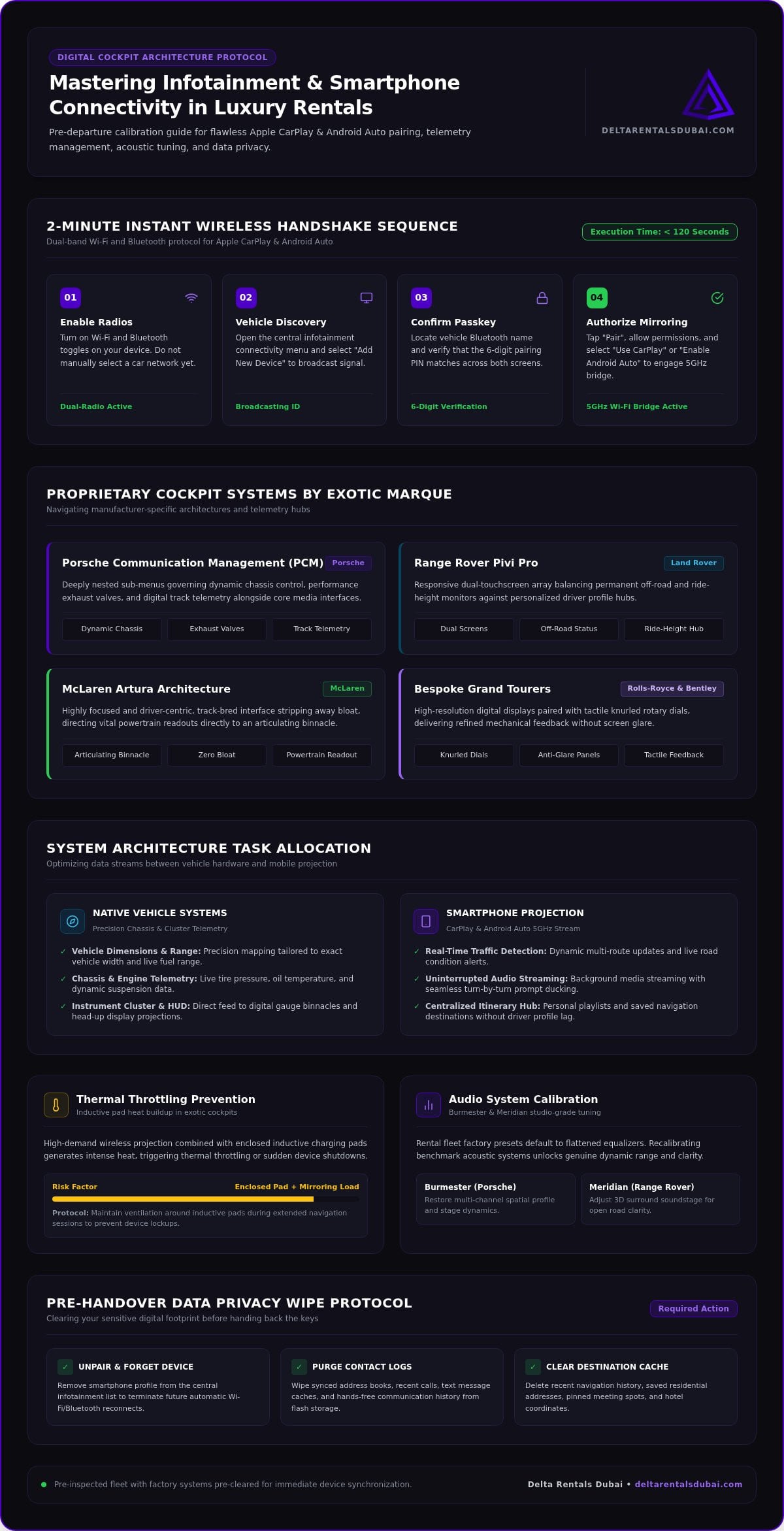
- Porsche Communication Management (PCM): Deeply nested sub-menus govern dynamic chassis control, performance exhaust valves, and digital track telemetry alongside media controls.
- Range Rover Pivi Pro: A responsive dual-touchscreen array balances permanent off-road and ride-height monitors against personalized driver profile hubs.
- McLaren Artura Architecture: Highly focused and driver-centric, this track-bred interface strips away bloat, directing vital powertrain readouts directly to an articulating binnacle.
- Bespoke Grand Tourers: Rolls-Royce and Bentley pair high-resolution digital displays with tactile knurled rotary dials, delivering refined mechanical feedback without screen glare.
The Critical Difference Between Native Systems and Smartphone Projection
Factory navigation systems provide precision mapping tailored to a vehicle’s exact width and fuel range, but third-party smartphone apps deliver superior real-time traffic detection. Wireless smartphone projection bridges this divide. High-end software architectures split tasks seamlessly. You can feed real-time routing onto the central display while maintaining chassis telemetry, tire pressures, and oil temperatures across digital gauge binnacles and head-up displays (HUDs).
A flawless smartphone connectivity and infotainment setup in luxury rental cars allows background audio to stream without interrupting turn-by-turn alerts. Elite platforms from Delta Rentals arrive thoroughly inspected, with factory systems pre-cleared for immediate device synchronization. You gain immediate access to your playlists and itineraries without fighting the previous driver’s leftover preferences.
Step-by-Step Smartphone Connectivity Setup in Luxury Rental Cars
Executing a flawless smartphone connectivity and infotainment setup in luxury rental cars takes less than two minutes when you follow the right sequence. Exotic models utilize multi-layered security handshakes to maintain stable mirroring at high speeds. Rather than fumbling through endless submenus while idling, complete this direct pairing workflow before shifting into gear.
Connecting Wireless Apple CarPlay and Android Auto Flawlessly
Wireless mirroring requires simultaneous Bluetooth authorization and high-speed Wi-Fi transmission. Follow these steps for an instantaneous handshake:
- Enable Radios: Turn on both Wi-Fi and Bluetooth toggles on your device. Do not manually select a car network yet.
- Initiate Vehicle Discovery: Open the central display’s connectivity menu and select “Add New Device.”
- Confirm the Passkey: Locate the vehicle’s Bluetooth name on your phone, then verify that the matching six-digit pairing PIN displays on both screens.
- Authorize Mirroring: Tap “Pair,” allow contact sync permissions, and select “Use CarPlay” or “Enable Android Auto” on the final prompt.
The vehicle automatically spins up a background 5GHz Wi-Fi bridge once the Bluetooth handshake completes. Keep Wi-Fi active on your smartphone so the video stream never stutters.
Managing Bluetooth Audio Codecs and Hands-Free Protocol
After mirroring connects, calibrate your media channels. Enter your phone’s Bluetooth settings and ensure high-definition audio codecs (such as AAC or LDAC) are enabled for uncompressed playback. Next, adjust outgoing microphone sensitivity within the car’s sound menu. High-performance exhausts generate deep acoustic resonance at idle; dialing up active noise reduction ensures crystal-clear voice calls without shouting over engine notes.
Establishing Guest Driver Profiles Without Complications
Always register your session under a temporary Guest profile instead of syncing an existing master profile. This simple boundary safeguards your digital life and prevents your phone from writing over stored seat memories or suspension presets. It also aligns with consumer advisories like the FCC guide on Data Privacy and Return Protocol, ensuring your cloud backups do not download onto an open vehicle drive.
Top-tier providers eliminate this friction entirely. Explore the fleet options available through Delta Rentals for fully configured cockpits that arrive wiped, updated, and ready for immediate guest synchronization. If you prefer white-glove assistance during vehicle delivery, simply connect with an automotive concierge to walk you through your vehicle’s custom settings in seconds.
Troubleshooting Wireless Phone Charging Pad Heat Buildup in Exotic Vehicles
Wireless mirroring combined with inductive charging creates a massive thermal load. Running high-refresh satellite navigation, streaming lossless audio, and processing background telematics pushes mobile processors to peak output. When paired with an inductive charging pad, the laws of thermodynamics take over. Managing device thermals is an overlooked part of smartphone connectivity and infotainment setup in luxury rental cars, especially when driving cross-country under direct sunlight.
Phones protect themselves through aggressive thermal throttling. When internal temperatures spike, your device dims its display, stutters audio, drops frame rates, and can shut down completely. Understanding the cause prevents sudden loss of navigation when you need it most.
The Physics of Inductive Charging: Why Luxury Trays Run Hot
Inductive charging relies on alternating magnetic fields between the car pad and internal phone coils. Wasted electrical energy converts straight into heat. Luxury cabins often tuck these wireless trays deep inside enclosed center consoles or armrest cubbies to preserve clean leather aesthetics. Without active airflow, trapped air temperatures rise quickly. Thick leather cases, wallet attachments, or magnetic backing plates increase physical distance between coils, spiking electrical resistance and intensifying heat output.
Practical Fixes: Active Cooling, Placement, and Case Management
You can maintain thermal balance with simple cockpit adjustments:
- Strip Heavy Protective Cases: Remove thick or metallic cases before setting your device onto the cradle to allow direct dissipation.
- Realign the Receiving Coil: Center your device over the tray indicator lines. High-speed cornering shifts phones away from coil centers, causing charging inefficiencies.
- Direct Cabin Airflow: Adjust secondary dash vents downward toward low-mounted console cubbies to keep cool ambient air moving over the tray.
Wired Connection vs. Wireless Induction: Reliability Breakdown
For demanding track sessions or multi-hour touring, hardwired tethering outperforms inductive pads. Dedicated high-wattage USB-C ports bypass electromagnetic heat generation, charging batteries faster while keeping devices cool. Direct cabling also eliminates radio interference in crowded urban zones, ensuring uninterrupted data throughput.
Security is equally vital. Cyber researchers highlighting FTC data privacy guidelines remind drivers that physical USB connections should be configured for “Charge Only” to prevent unauthorized local drive syncing. Pack a braided, high-speed cable in your travel luggage. It remains the most dependable fallback for flawless smartphone connectivity and infotainment setup in luxury rental cars.
Audio Calibration and Cockpit Customization for an Immersive Drive
Supercar cockpits combine mechanical roar with world-class acoustic engineering. Premium rental vehicles feature bespoke audio systems from Burmester, Meridian, and Bang & Olufsen, but rental turnarounds routinely reset sound profiles to flat factory defaults. Fine-tuning your acoustic settings transforms compressed mobile streams into rich, concert-hall dynamics that cut cleanly through high-rpm engine resonance.
Proper smartphone connectivity and infotainment setup in luxury rental cars extends beyond basic Bluetooth links. It creates a personalized soundstage that balances roaring exhausts against clear turn-by-turn alerts, ensuring spoken directions never abruptly cut off your favorite tracks.
Tuning High-End Audio Systems: Burmester, Meridian, and Bespoke Setups
Extracting the full dynamic range from exotic sound systems requires three immediate adjustments before you hit the road:
- Select 3D Spatial Staging: Activate Burmester 3D High-End or Meridian Trifield processing. These algorithms reconstruct standard stereo tracks across roof and footwell arrays to mirror cabin contours.
- Compensate for Mechanical Rumble: Lift mid-range frequencies slightly while maintaining neutral treble. This keeps vocals sharp and prevents deep sports exhaust notes from muddying bass lines.
- Disable Streaming Compression: Check your streaming app settings to select lossless audio over cellular networks. Turn off audio normalization options that artificially compress dynamic range.
Vehicles built for serene long-distance touring require their own acoustic calibration. Read our experience guide on the Rolls Royce Cullinan to discover whisper-quiet acoustic refinement and learn how bespoke sound systems perform in whisper-quiet cabins.
Synchronizing Head-Up Displays and Multi-Screen Instrument Clusters
Once audio dynamics are dialed in, align your visual cockpit feeds. Modern infotainment hubs pass mobile navigation data directly to high-definition head-up displays (HUDs) and digital driver binnacles. Projecting turn-by-turn vectors directly into your natural field of view lets you focus on the road ahead rather than glancing down at the center console.
Adjust HUD vertical height and brightness to align precisely with your driving posture. In performance supercars like the McLaren Artura or Porsche 911 GT3 RS, keep your primary cluster dedicated to essential telemetry such as oil temps, gear selection, and tire pressures. Route navigation directions and streaming playlists to auxiliary screens to keep critical performance gauges front and center.
Experience the thrilling balance of precision performance and pristine acoustics. Reserve your prestige rental today and enjoy an exotic cockpit calibrated to your exact audio standards.
Data Privacy and Return Protocol: Securing Personal Information
Modern luxury infotainment units do not just project your smartphone interface; they actively cache sensitive personal data. Onboard solid-state drives store contact lists, call histories, text previews, and recent GPS waypoints. A complete protocol for smartphone connectivity and infotainment setup in luxury rental cars requires closing the digital loop before handing back the keys. Leaving this data behind compromises your private travel itinerary and confidential address books.
A quick two-minute privacy audit guarantees complete peace of mind. Taking ownership of your digital footprint prevents the next driver from accessing your home address, client phone numbers, or recent destinations.
Step-by-Step Device Deregistration and Cache Purging
Erase your personal data swiftly using this straightforward exit sequence:
- Access the Device Manager: Navigate to the vehicle connectivity settings and open the paired device list.
- Forget the Device: Highlight your smartphone, select “Delete” or “Forget Device,” and confirm the removal of all cryptographic authorization keys.
- Wipe Onboard Navigation Caches: Open the vehicle’s native navigation menu. Clear all recent destinations, stored favorites, and custom route histories.
- Sever Mobile Permissions: Open your smartphone’s Bluetooth settings, select the vehicle profile, and tap “Forget This Device” to revoke future auto-pairing handshakes.
Completing these steps wipes stored credentials directly from local system storage, leaving zero trace of your trip.
The Elite Concierge Handover: Stress-Free Vehicle Return
Prestige rental services treat digital security with the same precision as mechanical maintenance. Elite vehicle providers conduct secondary data resets between client hires, wiping temporary caches and restoring factory defaults during vehicle turnaround. When returning your car, your automotive concierge can verify that all personal phone profiles and destination histories have been eradicated from the console.
Before stepping away, inspect the cockpit to collect personal high-wattage charging cables and phone mounts from hidden storage trays. Seamless digital integration and uncompromising privacy define modern automotive excellence. Experience pure mechanical precision paired with intuitive cockpit design through a high-performance Porsche 911 GT3 RS Rental, where driver-focused telemetry and effortless connectivity unite perfectly.
Elevate Your Drive with Frictionless Cockpit Technology
Mastering smartphone connectivity and infotainment setup in luxury rental cars transforms high-performance driving into an effortless experience. By establishing an instant guest handshake, preventing inductive charging heat spikes, and tuning surround acoustics to match cabin dynamics, you extract maximum enjoyment from every mile. A swift data deregistration before departure guarantees your sensitive contacts and routes remain completely private.
You never have to manage digital onboarding alone. Delta Rentals hand-delivers a pristine fleet of supercars and prestige vehicles directly to you, backed by personalized walkthroughs from expert automotive concierges. Stringent digital privacy sweeps and system resets between reservations ensure your cockpit arrives spotless, updated, and ready for immediate pairing. Take command of the open road with complete confidence: connect with an automotive concierge today to reserve your next high-performance drive.
Frequently Asked Questions
Will connecting my smartphone to a luxury rental car compromise my personal data?
Only if you fail to deregister the device before handover. When connecting via CarPlay or Android Auto, infotainment systems temporarily cache contact directories, recent calls, and GPS destinations. Modern smartphone connectivity and infotainment setup in luxury rental cars allows you to restrict permissions during the initial Bluetooth handshake. Selecting a guest profile and clearing stored device tokens upon return ensures your private data never remains accessible to subsequent drivers.
Why does my phone overheat on the wireless charging pad while running navigation?
Running processor-intensive navigation and high-bitrate streaming while drawing inductive current causes rapid internal heat accumulation. Inductive coils generate heat naturally through electromagnetic resistance, which worsens when phones are misaligned or encased in thick covers. Enclosed console trays lack ambient ventilation, triggering hardware thermal throttling. To prevent display dimming or total device shutdown, switch to a high-wattage USB-C cable or remove bulky phone cases.
Can I use wireless Apple CarPlay and Android Auto in every exotic vehicle?
Most modern luxury vehicles support wireless mirroring, but select track-focused supercars still require a physical USB connection. Dedicated lightweight platforms often omit secondary Wi-Fi modules to minimize harness weight and simplify cabin wiring. Always pack a high-speed data-rated cable alongside your wireless setup. Handover concierges verify platform compatibility during delivery so you know immediately whether your specific supercar requires a wired or wireless interface.
What should I do if the infotainment system refuses to recognize my phone?
Toggle your phone’s Wi-Fi and Bluetooth off and on, then restart the central display’s pairing search. Lingering Bluetooth tokens from previous connections often block fresh handshakes. If the connection still fails, delete the car from your phone’s known devices list and clear previous profiles from the vehicle’s device manager. Rebooting the car’s screen or plugging directly into the primary media USB port resolves nearly all handshake conflicts instantly.
Does streaming audio over Bluetooth degrade the performance of high-end car sound systems?
Yes, standard Bluetooth streaming uses lossy compression codecs that flatten the acoustic range of bespoke systems like Burmester and Meridian. Basic SBC codecs cut dynamic frequencies, resulting in hollow bass notes and muted highs. To experience full fidelity, stream via wireless Apple CarPlay, Android Auto, or a direct USB tether. These connections use high-bandwidth Wi-Fi or physical cables capable of transferring uncompressed, studio-grade audio signals.
How do I delete my paired device and navigation history before returning the car?
Navigate to the connectivity menu, select your phone profile, and press “Forget Device” or “Delete.” This command purges local cryptographic keys, address books, and recent text caches. Next, enter the native navigation settings to clear saved destinations and route logs. Complete your smartphone connectivity and infotainment setup in luxury rental cars by tapping “Forget This Device” in your phone’s Bluetooth settings, completely cutting future communication between both systems.