

What if the best setting in a rented supercar isn’t the most aggressive one? If unfamiliar buttons, dashboard menus, and track-labelled modes leave you unsure where to start, pause before driving. Setting up driving modes in a rented supercar means choosing a setup you understand, not proving what the car can do.
Different modes may change how a car responds, while display menus affect what information you see. The controls and effects vary by model, so don’t assume a Porsche, Ferrari, Lamborghini, or McLaren works like the last supercar you drove. Use the vehicle-specific handover and instructions to get familiar with the controls before setting off.
This guide explains what to look for, how to approach drive modes and display settings, and how to choose a sensible setup for your route and conditions. You’ll also get a simple routine for locating the relevant controls before driving, without accidentally selecting a track-focused configuration. Whether you’re renting a Porsche 911 GT3 RS or another high-performance car, focus on a setup you can clearly explain rather than relying on the selector’s labels.
Key Takeaways
- Understand what a driving mode may change, and why its effects depend on the specific car.
- Use a simple control-finding routine to locate the selector and verify the chosen mode on the display.
- When setting up driving modes in a rented supercar, choose for the road and conditions, not the mode’s boldest label.
- Make adjustments while safely parked, and follow the vehicle’s own operating instructions.
- Use the handover to learn the mode labels, display options, and how to return to a familiar setup.
Before setting driving modes in a rented supercar, understand what can change
The appeal is immediate: sharp performance, a distinctive cabin, and controls you may not have used before. Take a moment to get familiar with the car before choosing a mode. In a rented supercar, this helps you avoid treating an unfamiliar selector as a simple “more performance” switch.
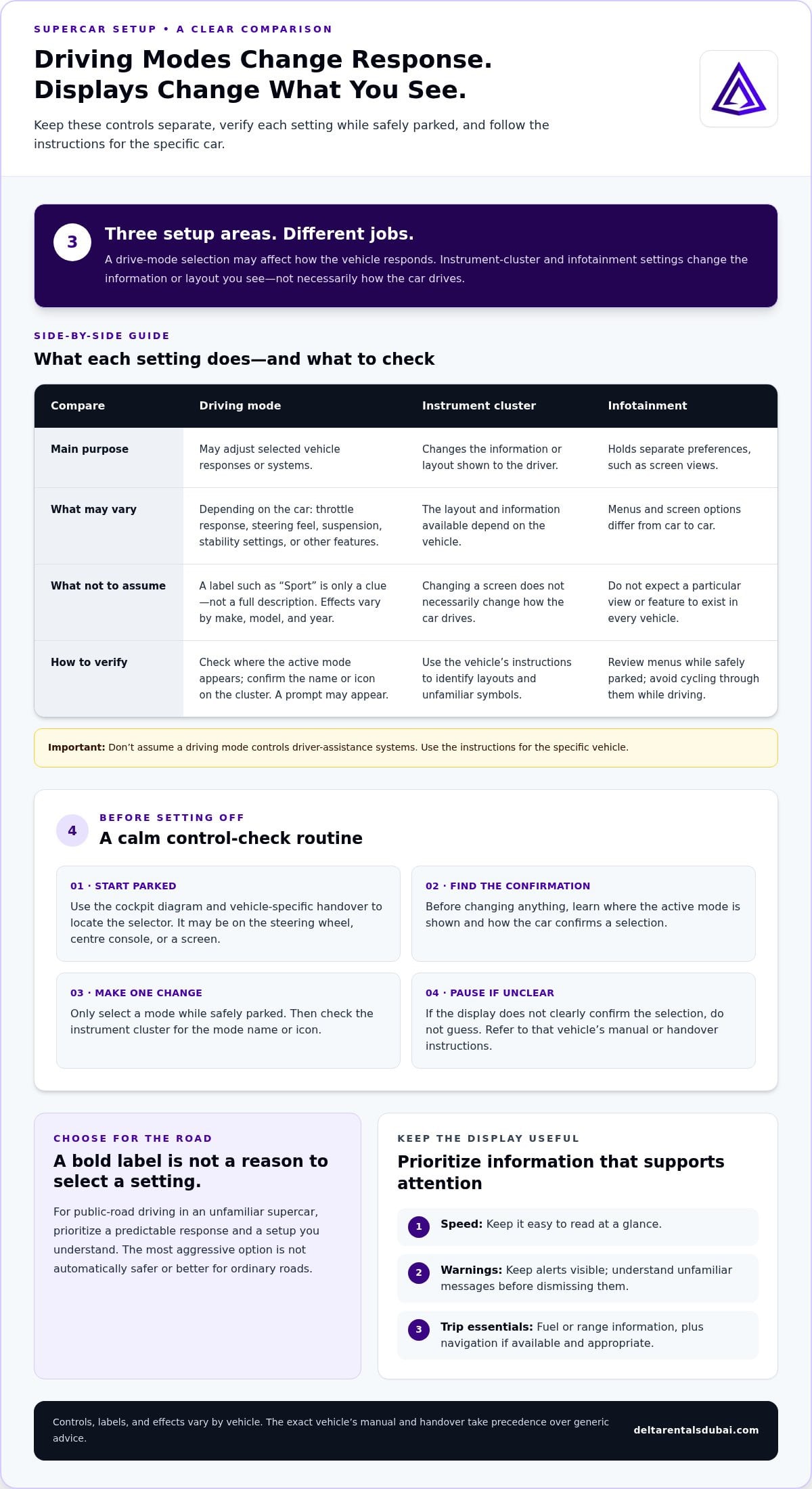
A driving mode is a vehicle setting that may adjust selected responses or systems. Its functions depend on the make, model, and year. A mode name alone doesn’t explain exactly how the car will behave, so don’t rely on generic instructions when setting up driving modes in a rented supercar.
What a supercar driving mode may change
Depending on the vehicle, a mode may affect throttle response, steering feel, suspension, or stability settings. It may adjust one of these, several, or other features. Treat familiar labels such as “Sport” as clues, not a full description of what’s selected.
Some cars also have driver-assistance technology. Advanced Driver-Assistance Systems refers to features that assist the driver, but don’t assume a drive mode controls or changes those systems. Read the car’s instructions to understand the features fitted to that specific vehicle.
Keep driving modes separate from display preferences
A mode selection and an instrument-cluster layout are different things. A driving mode may alter selected vehicle responses; a display setting changes the information or layout you see. Infotainment preferences, such as screen views, are separate again. Changing a screen can make information easier to read, but it doesn’t necessarily change how the car drives.
Why rented-car setup starts with familiarisation
A rental’s selector, dashboard indicators, and menus may be unfamiliar, even if you regularly drive a high-performance car. Start while safely parked. Locate the selector, find where the active mode appears, and identify the relevant menu without making changes on the move.
For a Porsche 911 GT3 RS or another performance-car rental, use the vehicle-specific handover to understand its controls rather than assuming another marque works the same way. The owner’s manual and instructions for that exact vehicle take precedence over generic online advice. If a label or display is unclear, pause and refer to those instructions before selecting a setting.
Display customisation changes what you see; driving-mode selection may change how the vehicle responds. Keep that distinction clear, then choose only a setting you understand.
Find the drive-mode selector and personalise the display without guesswork
Once you know that mode controls and screen preferences are separate, locate each deliberately. The selector could be on the steering wheel, centre console, or a screen. There’s no universal layout, even among high-performance cars.
Locate the selector and confirm your choice
Start with the cockpit diagram in the owner’s manual, then use the model-specific handover to identify the selector. Before changing anything, check how the car shows the active mode. Make a selection only while safely parked, then look for the mode name or icon on the instrument cluster. Some vehicles may show a confirmation prompt. Selector positions, labels, and display cues vary, so don’t rely on memory from another car.
If the display doesn’t clearly confirm your selection, pause and refer to the vehicle’s instructions instead of guessing. With a Porsche 911 GT3 RS rental, for example, follow that car’s own handover and manual rather than assuming its controls match another Porsche or supercar.
Choose a clear, useful display
Keep the view simple. Prioritise information that supports attention on the road:
- Speed: Make it easy to read at a glance.
- Warnings: Keep indicator lights or alerts visible, and don’t dismiss unfamiliar messages without understanding them.
- Trip essentials: Fuel or range information can be useful, along with navigation if available and appropriate for your journey.
Instrument-cluster layouts and infotainment menus differ by vehicle, so don’t expect a particular view or feature to exist. Change screen settings while safely parked, and avoid cycling through menus once you’re driving. If an unfamiliar symbol appears, use the manual or handover guidance to identify it. For context on driver-assistance features and their purpose, see NHTSA’s overview of safety technologies. Don’t assume a driving mode changes these systems; follow the instructions for the specific car.
This is the practical heart of setting up driving modes in a rented supercar: identify the control, make one change at a time, and verify what the car displays before moving off. A readable cluster and confirmed selection are more useful than a screen full of unfamiliar information.
Considering a performance-car rental such as the Porsche 911 GT3 RS? Make time to learn its selector and display through the vehicle-specific handover before your drive begins.
Choose a driving mode for the road and conditions, not the name
A mode label can sound like an invitation to push harder. Resist that reflex. For public-road driving in an unfamiliar supercar, prioritise a predictable response and a setup you understand. The most aggressive option isn’t automatically safer or better for ordinary roads.
Everyday, sport, and track-focused settings compared
Names and functions vary by make, model, and year. Treat these as common examples, not a promise about a particular car. Check the owner’s manual and model-specific handover for the vehicle you’re driving.
| Common label | General intent | Practical consideration |
|---|---|---|
| Standard or comfort-oriented | A familiar, composed feel for routine driving. | A sensible starting point when the car is new to you; confirm what the mode actually changes. |
| Sport-oriented | A more performance-focused feel, depending on the vehicle. | It may make the car feel more responsive, but that doesn’t make it the right choice for every road or condition. |
| Track-focused, where available | A setting intended for a suitable closed-course environment. | Don’t experiment with it on public roads. Its effects and prerequisites depend on the specific car. |
Some settings may be unavailable or restricted under particular vehicle conditions. Don’t try to override a prompt or infer the reason from the mode name. Follow the vehicle’s instructions and use a setting only in the context intended for it.
Let conditions and familiarity guide the choice
Consider what’s around you before selecting a mode. Reduced visibility, wet or otherwise low-grip surfaces, and busy traffic call for predictable control and smooth driving, not maximum performance. If you’re still learning the car’s response, stay with a familiar, road-appropriate setup until you understand what a change does.
Choose a mode by conditions and control, not its most dramatic label. This keeps setting up driving modes in a rented supercar grounded in the drive ahead, rather than assumptions about what “Sport” or “Track” must mean. A mode name is no substitute for the manual, a clear handover, or adapting your driving to the road.
Set up a rented supercar in five calm steps before driving
A clear routine makes an unfamiliar cockpit easier to manage. Complete each adjustment while safely stationary, and follow the instructions for the exact vehicle. Don’t use public roads to test acceleration, grip, or the difference between modes.
- Step 1: Park securely. Settle the car before exploring controls. Make adjustments only while safely stationary, never while moving or stopped where you need to focus on traffic.
- Step 2: Identify the controls. Locate the mode selector, instrument display, hazard controls, and any menu you’ll need. Control positions and labels vary, so use the cockpit diagram and handover guidance.
- Step 3: Review the instructions. Check how the selected mode is shown and how to return to the documented standard setting. If chassis or stability settings are unfamiliar, leave them at their documented standard setting rather than experimenting.
- Step 4: Select a familiar setup. Choose a road-appropriate setting whose behaviour you understand. Avoid track-focused options on public roads, and don’t assume a dramatic label means a better or safer choice.
- Step 5: Verify the display. Confirm the selected mode on the instrument cluster. Keep the view clear and legible, with essential driving information easy to see before you set off.
Complete a quick visibility and controls check
Before departure, adjust your seat and mirrors, check warning indicators, and make sure the selected mode and instrument display are clear. Locate the hazard controls and understand how to return to the standard display or setting using the vehicle’s instructions. Once you’re driving, keep your attention on the road. Don’t open menus or make setup changes on the move.
If a setting is unclear, pause
Don’t cycle through modes to discover what each one does. While parked, consult the owner’s manual or the instructions provided during handover. If the effect still isn’t clear, continue with a familiar, documented setup instead of guessing under pressure. A calm start matters more than exploring every control.
This five-step routine makes setting up driving modes in a rented supercar straightforward: identify, review, select, and verify before departure. Delta Rentals Dubai offers high-performance rentals including the Porsche 911 GT3 RS. Learn the vehicle’s controls through its model-specific handover before setting off. Explore a supercar rental.
Make the handover part of your supercar setup, and enjoy the drive
A confident start comes from a simple sequence: learn the controls, choose a sensible setting, check the display, then drive according to the conditions. Use the handover to understand the exact car in front of you. Mode labels and return-to-standard controls can differ between models, so a clear explanation is more useful than relying on assumptions.
Questions to resolve during the handover
Before setting off, have the vehicle’s controls explained while it’s safely parked. Make sure you can identify:
- The drive-mode selector and the dashboard indication that confirms the active mode.
- The documented standard setting for ordinary road use.
- Any chassis or stability controls that should remain unchanged for your drive.
- How to restore the original display or return to the standard mode, following the vehicle’s instructions.
Keep the owner’s manual and handover instructions as your reference. If a control or label is unclear, resolve it before departure rather than trying different options on the road. This matters especially in a rented car, where the layout and responses may be new even to an experienced driver.
From setup checklist to a confident rental
Take one final moment to check that you understand the selected mode, the cluster shows the expected setting, and essential information is easy to read. Then leave the menus alone and focus on the road. A composed drive means adapting to traffic and conditions, not testing acceleration, grip, or mode differences in public.
The Porsche 911 GT3 RS is available to rent through Delta Rentals Dubai. Learn its exact controls and setup through that vehicle’s own handover and instructions, rather than inferring them from another Porsche or supercar. Explore the Porsche 911 GT3 RS rental experience if you’re considering this model.
That’s the goal of setting up driving modes in a rented supercar: know what you’ve selected, understand how to return to a familiar setting, and enjoy the drive without guesswork. Delta Rentals Dubai also offers high-performance models from Porsche, McLaren, Ferrari, and Lamborghini. Each vehicle has its own controls, so use the handover to get familiar with your choice.
Make your next supercar drive feel familiar from the start
Confidence comes from understanding the car, not choosing its most dramatic setting. Before setting off, learn the selector and dashboard confirmation during the model-specific handover. Choose a sensible mode for the road and conditions, keep the display clear, and leave unfamiliar settings alone until you understand them.
That’s the heart of setting up driving modes in a rented supercar: make adjustments while safely parked, follow the vehicle’s instructions, and focus on a composed drive rather than testing performance on public roads. The Porsche 911 GT3 RS is among Delta Rentals Dubai’s rental offerings, alongside models from Porsche, McLaren, Ferrari, and Lamborghini. Each vehicle has its own controls, so let the handover guide your setup.
Ready to explore your options? Explore your supercar rental options with Delta Rentals Dubai. Start informed, stay in control, and enjoy the drive.
Frequently Asked Questions
Can I change driving modes in a rented supercar?
Often, but follow the rental instructions and the specific vehicle’s operating guidance. Controls and mode functions vary by model, so don’t assume a setting works like one in a car you know. Make adjustments only while safely parked, then check the instrument cluster to confirm the selected mode. If you’re setting up driving modes in a rented supercar for the first time, use the handover to understand the selector before departure.
What does sport mode do in a supercar?
Sport mode may change selected aspects of a car’s response, but the exact effects depend on the vehicle. It could influence systems such as throttle response, steering feel, or suspension, but don’t assume every car adjusts all of these. “Sport” is a label, not a universal specification. Read the model-specific instructions and choose a mode based on the road, conditions, and your familiarity with the car.
Is it safe to use track mode on public roads?
Track-focused modes are intended for appropriate closed-course use, not public-road experimentation. Their effects vary, and a dramatic mode name doesn’t mean a setting is suitable for everyday driving. On public roads, follow applicable local rules, account for traffic and road conditions, and use a setting you understand. Don’t test acceleration, grip, or mode differences in traffic. If you’re unsure what a setting does, leave it unchanged and consult the manual.
How do I find the driving-mode selector in an unfamiliar car?
Start with the owner’s manual and the model-specific handover, since the selector could be on the steering wheel, console, or screen. Look for labelled controls or mode icons, then make any selection while safely parked. Check the instrument cluster for a displayed mode name, icon, or prompt that confirms the choice. Selector locations, labels, and confirmation displays differ, so don’t rely on instructions for another model.
Can I customise the instrument cluster in a rented supercar?
Some vehicles allow display preferences to be changed, but available layouts and menus vary by model. A cluster adjustment changes what information you see; it isn’t necessarily a driving-mode or performance setting. While parked, choose a clear view that keeps essential information easy to read, and follow the vehicle’s instructions. Avoid exploring menus while driving, and don’t assume a particular display layout is available in every supercar.
What should I check before driving a rented supercar?
Before departure, adjust your seating position and mirrors, then check the warning indicators and confirm which driving mode is selected. Make sure the instrument display is clear and that you recognise the key controls, including hazards. Use the handover and manual to understand unfamiliar indicators or settings. Complete these checks while safely parked. Once moving, keep your attention on the road rather than changing modes or navigating menus.
What should I do if I do not understand a driving-mode setting?
Pause while safely parked and consult the vehicle manual or the instructions provided during handover. Don’t repeatedly switch modes just to discover what each one does, and don’t experiment while driving or under pressure. If the setting remains unclear, stay with a familiar, documented setup and leave unfamiliar chassis or stability controls unchanged. Confirm the selected mode on the display before setting off, then drive according to conditions.