

What if the most futuristic feature in a luxury rental is less useful than a familiar key? Advanced tech features in modern luxury rental cars can make access feel seamless, but an impressive name doesn’t explain what a system actually does. It’s sensible to wonder how a fingerprint or facial scan works, what happens to your data and whether the feature will be dependable when you need to drive.
Biometric access isn’t included in every rental car, even when the vehicle is high-end. This guide explains the technology in plain English and separates access from identity authentication and driver-assistance functions. You’ll also learn what to consider around privacy, convenience and reliability before using connected features. With that knowledge, you can weigh technology alongside comfort and performance when choosing a premium rental experience in the UAE, including from Delta Rentals Dubai’s range of luxury vehicles.
Key Takeaways
- Learn how advanced tech features in modern luxury rental cars support access, comfort, information or driving assistance, and how to separate practical benefits from technical labels.
- See how biometric access works through a simple credential-check sequence, while recognising that sensors and data handling vary by vehicle.
- Compare biometric access, phone-based digital keys and key fobs for convenience, privacy considerations and backup needs.
- Use a quick handover checklist to understand the access method, locate essential controls and learn the backup procedure before setting off.
- Choose a rental around your priorities for cabin comfort, driving purpose and ease of use; equipment can vary between models.
What Are Advanced Tech Features in Modern Luxury Rental Cars?
Which features genuinely change the experience, and which are simply technical labels? For a renter, advanced tech features in modern luxury rental cars are most useful when they make access easier, information clearer, the cabin more comfortable or driving assistance more supportive. A long feature name alone doesn’t tell you whether a system will matter during your trip.
Think of vehicle technology as a group of systems with different jobs, not a single measure of how modern a car is. Some manage entry and driver recognition. Others help you navigate, connect a phone, adjust the cabin or respond to driving conditions. These functions can work alongside one another, but they aren’t interchangeable. Equipment and operation vary by make, model, trim and model year, so don’t assume every luxury vehicle has the same setup.
- Access: How the vehicle recognises an authorised key, phone or other credential.
- Information: Displays and connected services that support navigation or provide vehicle and journey information.
- Comfort: Controls for the cabin environment and convenience features.
- Driving assistance: Systems designed to support the driver in particular situations, rather than replace attention or judgement.
Some systems connect the vehicle to external services or devices. For a wider overview of how connected car technology links vehicles with networks and digital tools, remember that connectivity is a category of technology, not a promise that every service or feature will be available in every car.
What does biometric keyless access mean?
Biometric authentication verifies identity using a measurable personal trait, such as a fingerprint or facial pattern; keyless entry describes how a vehicle can be unlocked without inserting a conventional key. The distinction matters. A biometric reader may check who you are, while a separate locking system carries out the unlock command. Biometric access is one possible way to authorise entry, not a feature guaranteed in every luxury vehicle.
In practical terms, the system needs to recognise an enrolled credential before it allows an action. The sensor, verification process and handling of credentials depend on the manufacturer and vehicle. “Biometric” describes the identity check, not necessarily how the door physically unlocks or how the vehicle starts.
How is access technology different from other car technology?
Entry systems and driver recognition relate to authorisation. Navigation and infotainment help with route information, communication and media; driver-assistance systems support specific driving tasks. A smartphone may unlock a vehicle using a stored digital credential, without the car identifying the driver through a fingerprint or face scan. These are distinct functions, even if they appear together in a technology overview.
For example, using a phone credential to unlock a door may save a step. It doesn’t, by itself, alter acceleration, handling or other performance. A useful test is to identify exactly what the feature changes, then decide whether that benefit suits your rental experience.
How Do Biometric Access and Connected-Car Systems Work?
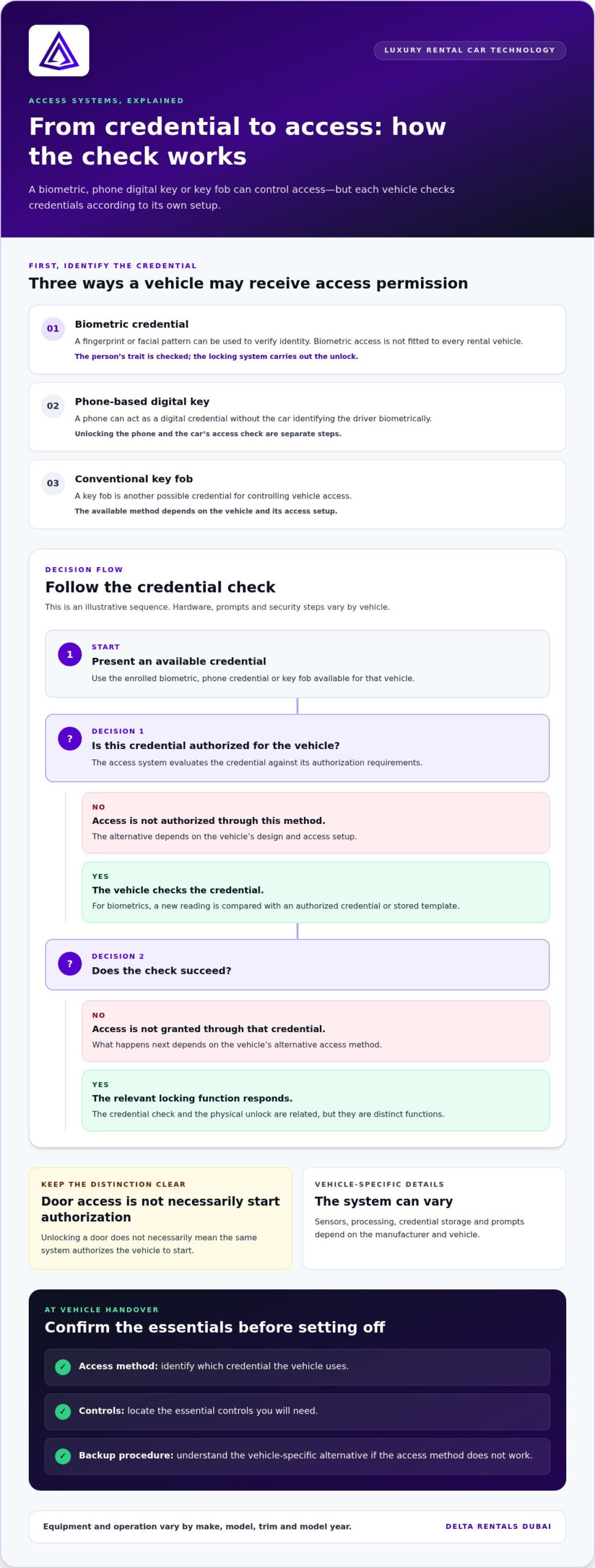
Behind a touch-free unlock is a straightforward idea: a vehicle receives a credential, checks whether it’s authorised, then responds. The credential might be a fingerprint or facial reading, a phone-based digital key, or a conventional key fob. These methods can all help control access, but they don’t work in the same way. The exact sensors, processing and credential storage vary by manufacturer and vehicle.
Illustrative access sequence:
- Credential presented: The driver uses an enrolled biometric, phone credential or key fob.
- System checks it: The vehicle’s access system evaluates the credential against its authorisation requirements.
- Access granted or denied: If the check succeeds, the relevant locking function responds; if not, access isn’t authorised through that method.
This is a simplified explanation, not a universal operating procedure. A vehicle may use different hardware, prompts and security steps. Access to a door also doesn’t necessarily mean the same system authorises the vehicle to start. Keep those distinctions in mind when assessing advanced tech features in modern luxury rental cars.
What happens when a driver uses biometric access?
Biometric use generally involves two stages. During enrolment, an authorised user’s trait is registered in a form the system can use. Later, the driver presents that trait, and the system compares the new reading with an authorised credential or stored template. Authentication verifies identity; the locking system controls access. The sensor, matching method, storage approach and on-screen prompts depend on the vehicle.
A fingerprint reader, for example, may assess a finger placed on a sensor. A facial system may use a camera-based reading. These examples explain the concept only; they don’t indicate that a specific system is fitted to any particular rental vehicle. If recognition doesn’t work as expected, the alternative depends on that vehicle’s design and access setup.
How do smartphones and digital keys fit in?
A smartphone can act as a digital credential without the vehicle identifying the driver biometrically. The phone itself might require its owner to unlock it, but that’s separate from the car’s access check. Bluetooth is short-range wireless communication that allows nearby devices to exchange signals. NFC, or near-field communication, works over a very short distance, typically when devices are brought close together. A digital key may use one of these methods, another approach or a combination, depending on the vehicle.
Don’t assume every digital key needs a live network connection or a particular phone setting. The method and backup options are vehicle-specific. Connected-car services may also support functions beyond unlocking, such as exchanging information with external services, but they shouldn’t be confused with the credential that authorises entry.
Understanding the access method can make the handover more straightforward and help you choose a rental experience around what matters to you. To explore a premium car rental, consider how comfort, access and ease of use fit your plans.
Biometric Access vs. Digital Keys: What Is Useful, and What Are the Trade-Offs?
Biometric access, phone-based digital keys and conventional key fobs can all make vehicle entry straightforward, but each relies on a different credential. The best fit depends on what feels convenient, what you’re comfortable carrying and how the vehicle handles a backup. Sophisticated access is an optional convenience, not proof of a better rental experience. For a useful comparison, look beyond the feature name to its everyday requirements.
| Access method | Convenience | Credential and privacy considerations | Backup considerations |
|---|---|---|---|
| Biometric access | Can avoid carrying or presenting a separate key, if the vehicle supports it. | Uses a personal trait, such as a fingerprint or facial reading. Ask what information is processed and how it’s handled. | Learn the alternative if recognition doesn’t work or the system isn’t available. |
| Phone-based digital key | Can keep access on a compatible smartphone instead of a separate fob. | Depends on a digital credential and may involve phone settings or an app. The car’s key method is distinct from how you unlock your phone. | Understand what to do if the phone is unavailable, discharged or not recognised. |
| Conventional key fob | Familiar and simple to carry and use. | Relies on possession of the fob rather than a biometric reading or phone credential. | Know whether a spare or alternative entry procedure is provided for the vehicle. |
Which access method suits which driver?
Biometric access may suit someone who values identity-based convenience and is comfortable using a personal trait to authenticate. A phone key can appeal to drivers who prefer a digital credential and have a compatible device. A conventional fob remains practical if you value a familiar, dedicated object that doesn’t depend on your phone. None is automatically the easiest option for every renter; the vehicle’s design and your habits make the difference.
What privacy and reliability questions deserve attention?
Biometric information is sensitive, but that alone doesn’t establish whether a particular system is secure or insecure. Handling practices differ, so consider what the system collects, how it processes the reading and what happens to associated data. For digital keys, consider device compatibility and what happens if the credential can’t be used. In either case, understand the vehicle’s backup access process before relying on the feature.
Reliability also means knowing how to respond to an ordinary snag. A biometric reader may fail to recognise a reading; a phone may be unavailable; a fob may be misplaced. Go through the access method and fallback procedure during handover, then make sure you understand them before setting off. These simple checks can matter more than a high-tech feature you may never need.
Use technology as one part of your rental decision. Comfort, driving purpose and ease of use still shape the experience, while access features should make the first step simpler, not add uncertainty. The strongest choice is the one whose benefits you understand and whose backup plan you’re comfortable with.
How Should Renters Use Advanced Technology in a Luxury Car?
A calm handover makes unfamiliar technology easier to use. Before setting off, identify how the vehicle is accessed, where essential controls sit and what to do if the usual access method doesn’t work. Treat this as part of getting comfortable with the car, not a technical test. Advanced tech features in modern luxury rental cars are most valuable when you know how to use them without distraction.
What should you learn before driving away?
Use the handover to walk through the vehicle’s own interface. Locate the door access method, ignition or start control, lighting, climate settings and media controls. Make sure you understand which credential is approved for the rental and how the vehicle’s backup access procedure works. If a menu or symbol is unfamiliar, get an explanation before leaving the parked vehicle.
- Access and start: Identify the key, fob, phone credential or other approved method, and learn how to start and secure the vehicle.
- Essential controls: Find the lights, climate settings, indicators and media controls you expect to use.
- Displays and alerts: Notice where warnings and system messages appear, and how to view their explanations while parked.
- Backup procedure: Understand the alternative provided for access if the primary credential isn’t available or recognised.
Resist the urge to explore every setting on the move. Set your preferred climate or audio options while stationary, and take time to understand unfamiliar menus before joining traffic. A brief orientation can prevent a small question from becoming a distraction at the wrong moment.
How can you avoid relying too heavily on assistance features?
Separate access functions from driving assistance. A system that recognises a key or helps unlock a door doesn’t guide the vehicle on the road. Assistance features may provide alerts or support specific tasks, but their capabilities and limits vary. Read unfamiliar warnings and learn what a control does while parked; don’t experiment with settings while driving.
Driver assistance supports your judgement; it doesn’t replace your attention or responsibility. Keep your focus on the road, respond to the conditions around you and use each feature only as intended. If a warning appears and you’re unsure what it means, prioritise safe control of the vehicle and consult its guidance when stopped safely.
Comfort with the controls helps make a premium drive feel composed from the first moment. If you’re considering a vehicle for your next trip, discuss a premium rental and choose an experience that suits your plans.
Choosing a Modern Luxury Rental for the Experience You Want
The right rental starts with the experience you want, not the longest list of technology. Consider four priorities: how you prefer to access the car, what kind of cabin experience matters, what you’ll use the vehicle for and how easily you can operate its controls. Then weigh advanced tech features in modern luxury rental cars against those needs. A feature earns its place when it adds comfort or confidence without making the drive more complicated.
Which vehicle experience matches your priorities?
Think in terms of purpose, not technology rankings. A performance-focused drive, a grand-touring journey and spacious luxury are different priorities, and the vehicle should suit yours. The Porsche 911 GT3 RS is one example in Delta Rentals Dubai’s premium fleet; the Rolls-Royce Cullinan Black Badge is another. These are rental options, not proof of any particular access system or equipment.
- Access comfort: Consider which credential feels simplest to use and whether you’re comfortable relying on a phone or biometric check.
- Cabin experience: Prioritise the space, atmosphere and comfort that fit your journey.
- Driving purpose: Decide whether you’re seeking a performance-focused experience, grand touring or spacious luxury.
- Ease of use: Choose controls and systems you can understand and operate without distraction.
Model equipment varies by make, trim and model year. Don’t assume a vehicle has biometric access, a digital key or a specific driver-assistance feature simply because it’s a prestige model. Consider technology alongside the vehicle’s overall character. For a performance-led choice, explore the Porsche 911 GT3 RS rental experience as part of deciding what kind of drive you want.
What is the simplest next step for a renter?
Start with your plans and the level of comfort you want, then compare vehicle categories against them. Delta Rentals Dubai offers premium vehicle rentals across the United Arab Emirates, with options that include Porsche, Rolls-Royce, Ferrari, Lamborghini and McLaren vehicles. An ultra-luxury travel experience may lead you to consider the Rolls-Royce rental category, while a different trip may call for another style of vehicle.
Before choosing, picture the full journey: who’s travelling, what kind of driving experience you want and which controls or access method you’ll find intuitive. Use the handover to understand the selected vehicle’s actual equipment and essential functions. That keeps expectations grounded in the specific model rather than assumptions about its badge or technology. The Rolls-Royce Cullinan Black Badge is among the rental options to consider for an ultra-luxury experience.
Keep the decision straightforward. Choose the experience first, then assess whether the vehicle’s technology makes it easier to enjoy. Plan your luxury rental around the drive and comfort you have in mind.
Make Your Next Drive Feel Effortless
Let technology serve the experience you want. Decide what would make your journey feel more comfortable and intuitive, then use that as your guide when selecting a vehicle. Advanced tech features in modern luxury rental cars can add convenience, but the best choice fits your preferences without compromising ease.
Delta Rentals Dubai offers premium vehicle rentals across the United Arab Emirates, with options including the Porsche 911 GT3 RS, Rolls-Royce Cullinan Black Badge and McLaren Artura. Each brings a distinct prestige-car experience. Choose the kind of drive you’re looking forward to, and let that lead your decision.
Ready to take the next step? Explore your premium rental options and start shaping a drive that feels right for you. The right choice can make every part of the journey feel more considered, from the first moment of access to the time you arrive.
Frequently Asked Questions
Is biometric access standard in every modern luxury car?
No. Biometric access isn’t standard across all luxury cars, and a premium badge doesn’t guarantee it. Equipment can differ between models and versions, so treat “keyless” or “advanced” as broad descriptions rather than confirmation of fingerprint or facial recognition. When comparing advanced tech features in modern luxury rental cars, look for details about the specific vehicle and its equipment instead of assuming a feature comes with the category.
Can more than one driver use biometric access in the same car?
Possibly, if the vehicle’s system supports multiple authorised users and each driver has been enrolled through its approved process. The number of profiles and how they’re managed vary by system. In a rental, don’t try to add or change biometric profiles unless the handover instructions allow it. If another authorised driver will share the car, establish which access credential each person should use before setting off.
What happens if a biometric sensor does not recognise the driver?
The system may decline that attempt, leaving the vehicle locked or the requested function unavailable through that method. Follow the prompt shown by the car and use the backup access method explained at handover, such as an authorised key or fob if provided. Avoid repeated guesses or unfamiliar settings. If the alternative doesn’t work, pause in a safe place and follow the rental’s support instructions.
Does biometric keyless access mean the car stores a fingerprint image?
Not necessarily. A system may process a reading into a biometric template for comparison rather than retain a conventional photograph of a fingerprint, but storage and processing methods vary. The feature name alone doesn’t tell you what information is kept, where it’s stored or for how long. Review the vehicle’s privacy information and rental instructions before enrolling a personal biometric, and understand how to remove it after use if applicable.
Can a biometric system unlock a car and start its engine?
Sometimes, but biometric access doesn’t automatically control both functions. A vehicle may use biometric verification to allow entry, while starting requires a separate key, phone credential or other authorised step. Another system may connect identity verification to more than one function. Check the vehicle’s instructions to learn which actions the biometric system authorises, and don’t assume that opening the door means the car is ready to drive.
Are biometric vehicle features affected by model year?
Yes. Equipment and system behaviour can vary with model year, trim, manufacturer updates and the vehicle’s configuration. Two cars with the same model name may not have identical access technology. For a rental, rely on the actual vehicle’s instructions and handover explanation rather than information about a different year or version. This is especially useful if you’re expecting a specific sensor, enrolment option or fallback method.