

What if a smooth client call starts with a conversation before you leave the dock? Hosting VIP clients on a luxury yacht in the UAE calls for more than a Wi-Fi password. Guests may need to stay reachable, but onboard internet performance can vary with the yacht, route and connection available.
Plan connectivity around the moments that matter, set clear expectations and have a simple backup in mind. This lets guests handle essential work without turning a relaxed charter into a technology briefing.
This guide explains how onboard Wi-Fi, cellular coverage and satellite internet can fit into a yacht-hosting plan, along with the limits to consider before promising uninterrupted calls or high-speed access. You’ll learn how to match connectivity to guests’ needs, prepare for important communications and keep the focus on a polished experience. With thoughtful planning, a luxury yacht rental from Delta Rentals Dubai can provide an elevated setting for client hospitality while technology stays discreetly in the background.
Key Takeaways
- For hosting VIP clients on a luxury yacht, plan connectivity around the event’s purpose rather than assuming Wi-Fi alone will meet every need.
- Distinguish between onboard Wi-Fi coverage and the internet connection feeding it. Each affects the guest experience in a different way.
- Match the setup to the task, from messaging and email to video calls and presentations, and decide which activities need a backup plan.
- Prepare critical calls, presentation formats and attendee devices before the charter, then keep essential files accessible offline.
- Build connectivity into the schedule discreetly so guests can stay productive when needed without letting technology take over the occasion.
Luxury yacht connectivity for VIP hosting: what the experience requires
Business guests may need to coordinate arrival, reply to messages, join a call or open a presentation during a yacht charter. A polished experience starts by identifying which tasks matter, then setting realistic expectations before guests step aboard.
Yacht connectivity combines onboard Wi-Fi, an internet source and the devices guests use. Wi-Fi connects phones, tablets and laptops to a local network; it doesn’t create internet access by itself. The internet connection comes from a separate system, and its performance can vary with the technology and operating conditions. Keep that distinction clear when planning VIP client hosting aboard a luxury yacht.
The Superyacht reference offers general context on these vessels. Practical connectivity planning depends on the individual charter, so don’t assume that a luxurious setting means every online task will work as it would in an office.
What does executive internet mean aboard a yacht?
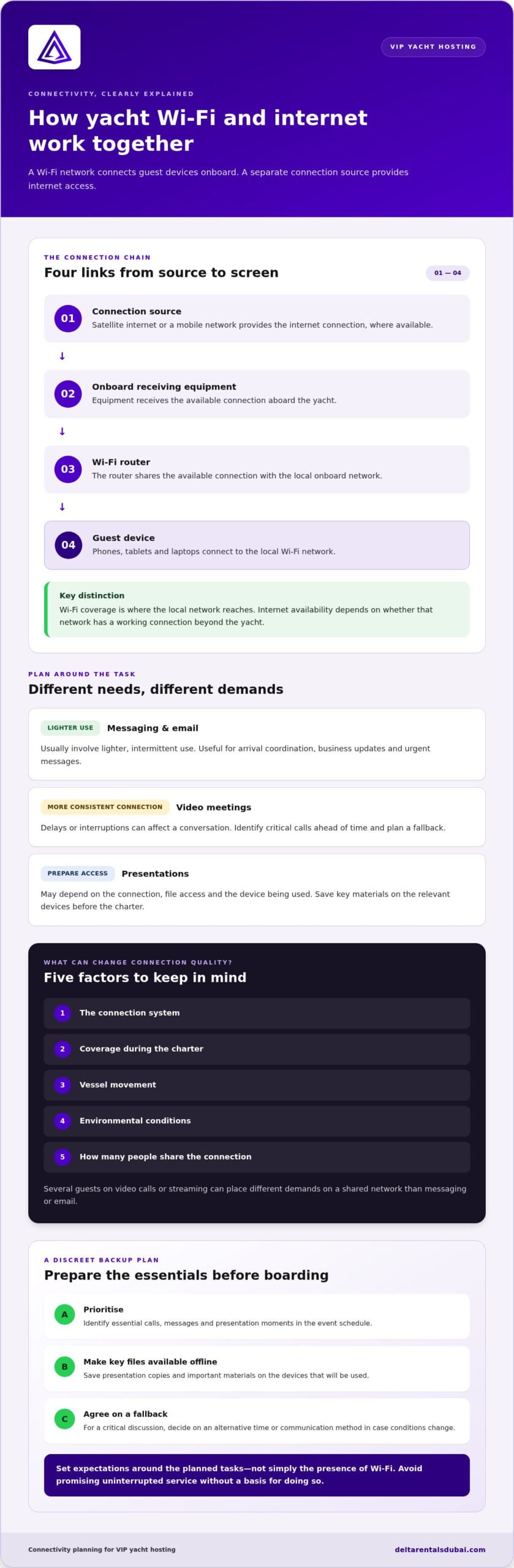
Think about the tasks guests need to complete, not simply whether Wi-Fi is available. Email and messaging usually involve lighter, intermittent use. Video meetings need a more consistent connection, while sharing a presentation may also depend on file access and the device being used. Performance depends on the connection system and conditions during the charter, so avoid promising uninterrupted service without a basis for doing so.
Which client-hosting moments depend on connectivity?
Map online needs against the event schedule. Arrival coordination and business updates may call for messaging; a scheduled discussion may need a quiet place to take a call; a digital presentation may require a screen or files ready to open. Treat each as a separate need, with its own practical plan.
Separate essential moments from optional activity. A critical call or presentation deserves preparation and a fallback, while casual browsing, streaming or social media can remain optional. Before the charter, tell attendees what the plan is, when work-related activity is scheduled and whether they should download key files in advance. A short briefing helps guests arrive prepared and keeps the rest of the experience relaxed.
- Essential: scheduled calls, urgent messages and presentation materials.
- Flexible: routine browsing and non-essential online entertainment.
- Offline-ready: key files, contact details and presentation copies saved on the relevant devices.
How satellite communication and yacht Wi-Fi work together
Think of onboard connectivity as a chain, not a single feature. A connection source must reach the yacht, onboard equipment must pass it to a local network, and guest devices must connect to that network. If any link is limited, Wi-Fi can still appear on a phone while internet access is slow or unavailable.
The basic path is satellite or mobile network, onboard receiving equipment, Wi-Fi router, then guest device. Wi-Fi coverage describes where the local network reaches aboard; internet availability describes whether that network has a working connection beyond the yacht. They’re related, but they aren’t the same.
Satellite internet, mobile networks, and onboard Wi-Fi
Satellite internet can provide a connection where shore-based mobile coverage isn’t available, while a mobile network may work where its coverage reaches the vessel. The router then shares the available connection with devices onboard. VSAT describes a type of satellite system; Starlink, Inmarsat and Iridium are industry names associated with satellite communications. These examples explain the options, not the equipment on a particular yacht.
The FCC’s Maritime Mobile Service regulations page describes maritime communications in a US context. It provides background on ship-to-shore communications.
Why connection quality can change during a charter
Performance may vary with the connection system, coverage, vessel movement and environmental conditions. The number of people sharing the connection matters, too: several guests on video calls or streaming at once can place different demands on a shared network than messaging or email. For hosting VIP clients on a luxury yacht, plan around priority tasks rather than assuming fixed speeds or uninterrupted service.
Use a simple, practical approach:
- Prioritise: identify essential calls, messages or presentations before the event.
- Reduce avoidable demand: download key files in advance and avoid relying on live streaming for work presentations.
- Prepare a fallback: keep important materials accessible offline and agree on an alternative time or communication method for a critical discussion.
These steps won’t control the signal, but they can help you stay composed if conditions change. Keep connectivity planning discreet and let the setting remain the focus. To explore a tailored luxury experience, consider the occasion and your guests’ needs as you plan.
Choosing yacht connectivity for calls, meetings, and client privacy
Set connectivity expectations by task, not by the presence of a Wi-Fi network. A message or short email is different from a video meeting, where delays or interruptions can affect the conversation. Onboard Wi-Fi doesn’t guarantee shore-like performance: the experience depends on the internet connection, conditions during the charter and how many people are using it at once.
When hosting VIP clients on a luxury yacht in Dubai, rank each online activity as essential, useful or optional. This keeps important work in focus without making constant connectivity the centre of the experience. Industry coverage of modern satellite technology describes evolving options, but a general overview can’t guarantee how a specific yacht connection will perform.
What internet tasks are realistic during a yacht charter?
Email and messaging are usually less demanding than live video calls or streaming. Meeting quality can change with connection conditions and concurrent use, so avoid scheduling a critical discussion around an untested connection. Download presentations and essential files before departure, and keep a local copy ready to use offline.
Task: Email and messaging
Likely demand: Lower, intermittent use
Backup: Send time-sensitive details before departure; save key contact information offline.
Task: Video call
Likely demand: Higher, with consistent connectivity important
Backup: Agree on a rescheduling or alternative communication plan.
Task: Digital presentation
Likely demand: Variable, especially if files need to load or stream online
Backup: Download the presentation and bring an offline copy.
Task: High-bandwidth entertainment
Likely demand: Potentially substantial, especially with multiple users
Backup: Make it optional and have entertainment available offline.
How should organisers handle confidential client work?
Privacy needs its own plan. Wi-Fi access doesn’t guarantee network security, and a premium setting doesn’t replace an organisation’s data safeguards. Ask guests to follow their employer’s device and data-security policies. If a network hasn’t been approved for sensitive work, don’t use it for confidential material; keep private files offline or use an approved security arrangement.
For a critical presentation, store the required materials on an authorised device and prepare a version that doesn’t rely on live access to cloud files. This creates a practical fallback while keeping sensitive work within the organisation’s rules. Keep the plan discreet, clear and proportionate to what guests need to do.
A practical pre-charter checklist for connected VIP events
A few focused decisions before the charter can prevent last-minute scrambling. Start with the work guests genuinely need to do, prepare for those moments and let the rest of the occasion unfold naturally.
Plan the event around its essential online tasks
Use this sequence to turn connectivity needs into a practical event plan:
- 1. Identify users and tasks. Note who needs to connect, whether for a call, messaging, email or a presentation.
- 2. Mark critical moments. Schedule time-sensitive calls and business updates. Separate these from optional browsing or entertainment.
- 3. Check presentation needs. Confirm the file format and device required to show it. Save the presentation, agenda and essential documents for offline access.
- 4. Prepare a coordination backup. Choose another way to pass on urgent updates if internet access is unavailable or unreliable.
- 5. Account for attendee devices. Ask which devices guests plan to use and ensure required files can be opened on them without a live connection.
- 6. Set expectations early. Brief attendees on planned work moments and explain that onboard internet performance can vary. Invite them to download necessary materials in advance.
Prepare guests and devices without overcomplicating the experience
Keep the pre-event message short and useful. Ask guests to update their devices, bring chargers and save relevant files locally. If a presentation is essential, have a second offline copy on an approved device. For confidential work, remind attendees to follow their organisation’s security policies.
Build flexibility into the schedule. Leave room to move a call or discussion if conditions change, rather than letting a connection issue interrupt the event. Hosting VIP clients aboard a luxury yacht should feel considered, not like a troubleshooting session. Assign one organiser to handle coordination, keep devices out of sight when they’re not needed and let hospitality take centre stage.
For a yacht event, align the setting, guest purpose and schedule before finalising the details. Delta Rentals Dubai offers luxury yacht rentals as part of its premium experience services. Explore a tailored VIP experience as you shape an occasion where connectivity supports the plan without dominating it.
Hosting VIP clients aboard a luxury yacht: connect the plan to the experience
A successful client event doesn’t ask guests to choose between a useful business conversation and a memorable setting. It brings the purpose of the gathering, online requirements and schedule together, while leaving room for connection beyond the agenda. Treat connectivity as thoughtful support, not the main attraction.
Balance business priorities with a premium guest experience
Start by identifying what the event must achieve. If a presentation or call is essential, schedule it as a distinct part of the gathering rather than letting work interruptions scatter across the occasion. Keep the agenda concise, allow flexibility around important moments and have a non-digital alternative ready where practical, such as printed talking points or an offline presentation.
Then protect the relaxed parts of the experience. Guests should know when they may need to be available, but they don’t need to spend the entire charter checking a connection. Share expectations in advance, prepare key materials before departure and make it easy to set devices aside once business priorities are complete. A calm plan helps technology stay in the background.
Plan the yacht experience with Delta Rentals Dubai
Delta Rentals Dubai offers luxury yacht rental experiences for elevated client hospitality. Connect the charter to the occasion by considering the guest purpose, the timing of any business activity and the atmosphere you want to create. Keep internet expectations realistic: a yacht rental doesn’t, by itself, establish what onboard connectivity is available or how it will perform. Build the event plan around what guests need to accomplish, and prepare sensible offline alternatives for essential work.
Before the event, bring the details into one simple run-through: confirm the schedule, identify the moments that truly need connectivity, prepare presentations and files for offline access, and let attendees know what to expect. Assign one person to manage coordination so guests aren’t drawn into troubleshooting. With those essentials handled, the yacht can provide a distinctive setting while hosting remains polished, personal and relaxed.
Planning a client occasion aboard a yacht? Discuss your yacht rental plans with Delta Rentals Dubai.
Make connectivity part of a polished hosting plan
Exceptional client hosting doesn’t depend on being online every moment. It depends on knowing which moments matter. Separate essential calls and presentations from relaxed time, prepare key materials for offline access, and give guests realistic expectations about onboard internet. These steps help technology support the occasion without taking it over.
Connect the event’s purpose, schedule and backup plan before the charter. Remember that Wi-Fi and internet access are different, and don’t assume a network is suitable for confidential work without an approved security arrangement.
Delta Rentals Dubai offers luxury yacht rentals as part of its premium experiences. With thoughtful planning, a yacht can set the scene for memorable hospitality while work essentials remain organised and discreet. Discuss your yacht rental plans and start shaping an experience your guests will remember.
Frequently Asked Questions
Does a luxury yacht have Wi-Fi for guests?
Some yachts provide guest Wi-Fi, but its availability and internet connection can vary by vessel and charter. Wi-Fi is the onboard network connecting devices; it doesn’t create internet access on its own. Don’t assume that a yacht’s luxury features include a particular connection or level of performance. Identify the online tasks guests need to complete and prepare offline options for anything essential.
How does satellite internet work on a yacht?
Satellite internet connects onboard receiving equipment to a satellite network, then a router can distribute that connection through Wi-Fi to guest devices. The satellite link is the internet source; Wi-Fi is the local connection between devices and the onboard network. Performance depends on the equipment, service and operating conditions. Treat satellite access as one possible connection method, not a promise of uninterrupted coverage throughout a charter.
Can you make video calls while aboard a yacht?
Video calls may work if the available connection can support a stable, ongoing data exchange, but call quality isn’t guaranteed. It can change with coverage, conditions and the number of people using the connection. For an important meeting, keep the agenda focused, download supporting material in advance and agree on a fallback, such as rescheduling or switching to a lower-bandwidth communication method.
What affects internet connectivity during a yacht charter?
Connectivity can depend on the connection source, available coverage, onboard equipment, vessel movement and environmental conditions. Shared use matters too: several simultaneous calls or high-bandwidth activities may affect the experience for other guests. Don’t assume a fixed speed or uninterrupted access. Prioritise essential online tasks, keep important files available offline and build flexibility into the schedule in case conditions change.
Is yacht Wi-Fi secure enough for confidential business calls?
Wi-Fi availability alone doesn’t establish that a network is secure or approved for sensitive work. Guests should follow their organisation’s device and data-security policies and avoid handling confidential information over a network without an approved security arrangement. For private materials or critical presentations, prepare an offline copy on an authorised device. Keep sensitive discussions discreet and use communication tools approved by the relevant organisation.
What should I prepare before hosting clients who need internet access?
List who needs to connect, what they’ll do and when, then identify which tasks are essential. Confirm presentation formats and the devices needed to open them. Download agendas, files and contact details for offline access, and choose a backup method for time-critical coordination. Brief guests beforehand about realistic connectivity expectations. This preparation helps hosting VIP clients on a luxury yacht feel organised without letting technology dominate the event.
Can guests work online and enjoy a yacht event at the same time?
Yes, with a schedule that gives work and hospitality their own space. Set aside a defined window for essential calls or presentations, then leave relaxed moments free from planned online tasks. Keep the agenda concise and have offline materials ready in case the connection changes. Let guests know when they may need to be available so they can prepare and enjoy the occasion without constantly checking their devices.