

Could a few hurried clips really help explain a vehicle’s condition later? Only if they’re clear, thorough, and matched to the written handover record. Follow these pre-rental vehicle inspection video recording best practices to create an organized record before you drive away, rather than filming whatever catches your eye in a rush.
It’s sensible to want evidence of what was already there, but a video alone doesn’t guarantee that a disagreement will be resolved. This guide takes you through a steady exterior and interior filming sequence, the details worth capturing, and how to compare your observations with the rental provider’s written condition report. You’ll also find questions to raise before accepting the vehicle. Whether you’re renting a premium vehicle in the UAE or another type of car, a few deliberate minutes can help you leave with a more complete record.
Key Takeaways
- Follow pre-rental vehicle inspection video recording best practices by filming in steady light, moving slowly, and capturing the vehicle in a clear sequence.
- Use video to show the overall condition and context, then take close-up photos of small marks or damage.
- Compare visible issues with the written condition report and ask the rental provider to note any discrepancy before you leave.
- Review your footage, keep the original file, and save a secure backup with the handover documents.
- Before confirming the rental, ask how to report a condition concern and whether you can keep a copy of the completed check-in record.
Why record a pre-rental vehicle inspection video before you drive?
A pre-rental inspection video is a supplementary record of the vehicle’s visible condition at handover. It can help you recall where a mark appeared and support a clear, factual conversation if a question comes up later. Keep it with the rental provider’s written condition report, rather than treating it as a replacement for that report or your rental agreement.
The principle is similar to an independent pre-purchase inspection: assess and record a vehicle’s condition before taking possession. A handover video isn’t an independent mechanical inspection, though. It captures what you can see at that moment, so describe what the footage shows without assuming it establishes the cause of any damage.
A slow, complete recording is more useful than scattered clips because it shows the vehicle as a whole and helps place each visible mark in context. That’s the foundation of effective pre-rental vehicle inspection video recording best practices.
What can a handover video document?
Move methodically around the vehicle, showing its overall appearance before focusing on individual details. Capture visible scratches, dents, wheel marks, cracked lights, the windscreen, and interior wear. For each mark, show its location on the vehicle, then move closer so its appearance is clear. If it’s safe and appropriate, record the dashboard display and odometer while the vehicle is stationary.
Use calm, specific narration if it helps. “Scratch on the left rear door” is more useful than “damage here.” Keep the camera steady and make sure the footage shows the feature you’re describing.
What can the video not guarantee?
Footage can’t guarantee that every fault or hidden area is documented, or establish exactly when or how a mark occurred. Lighting, camera angle, and image quality affect what’s visible. The rental provider’s inspection process and the terms of the agreement still matter, so check the written record rather than relying on video alone.
Before departure, compare what you can see with the condition report. If damage is unclear or missing from the paperwork, point it out and ask the rental provider to record it. Keep the conversation factual and request a copy of the updated documentation. A careful record won’t guarantee a particular outcome, but it gives you and the provider a clearer starting point if a question arises.
How to film a rental vehicle inspection video, step by step
Use a consistent route before leaving the pickup area. Good light, a steady pace, and a clear link between each close-up and its location make footage easier to review. These pre-rental vehicle inspection video recording best practices help you capture useful context without turning the handover into a rushed filming session.
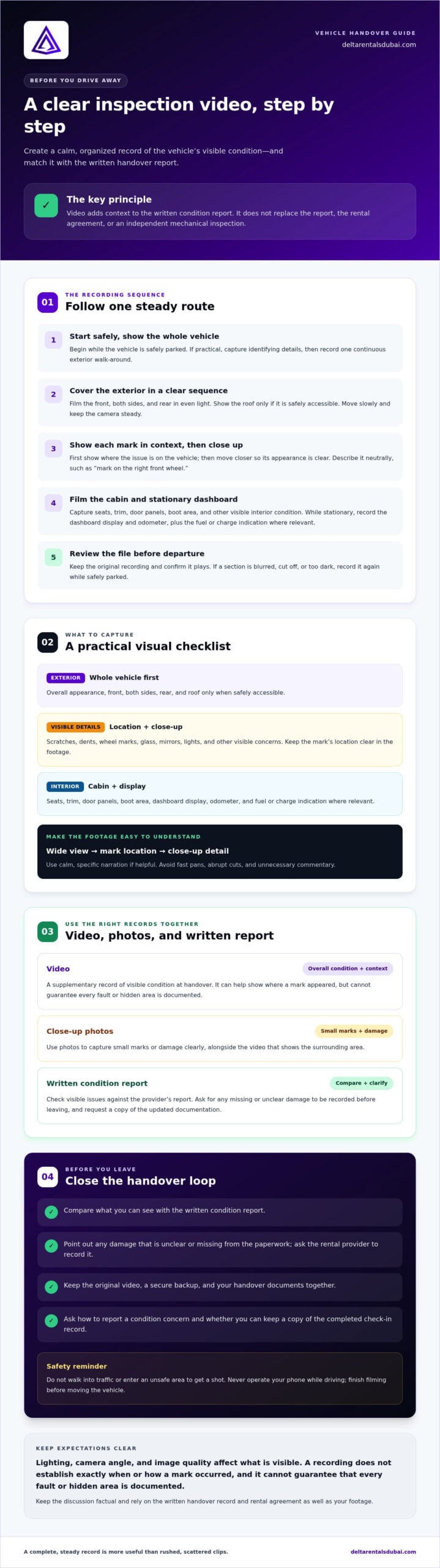
- Start with the vehicle and surroundings. Begin recording while safely parked. If practical, capture the vehicle’s identifying details, then show the full exterior in one continuous walk-around.
- Complete the exterior pass. Cover the front, both sides, and rear. Show the roof only if it’s safely accessible. Keep the camera steady and move slowly in even light. Don’t walk into traffic or enter an unsafe area to get a shot.
- Record visible marks in context. Pause on scratches, dents, wheel condition, glass, mirrors, and lights. First show where a mark is on the vehicle, then move closer for detail. Narrate neutrally, such as, “Mark on the right front wheel.” Don’t cover the mark with your hand or move so close that its location becomes unclear.
- Film the cabin and dashboard. Capture the seats, trim, door panels, boot area, and other visible interior condition. With the vehicle stationary, record the dashboard display and odometer. Include the fuel or charge indication where relevant, then compare it with the handover record.
- Check the file before departure. Keep the original recording and confirm that it plays. If a section is blurred, cut off, or too dark, record it again while you’re still safely parked.
Keep the footage clear and reviewable
Avoid fast pans, abrupt cuts, and unnecessary commentary. A continuous clip can link the vehicle’s overall condition to specific details, making it easier to understand than disconnected shots. When documenting a concern, show the wider area first and then the mark itself.
Never operate your phone while driving. Finish filming before moving the vehicle, and keep the rental provider’s written condition report and agreement with your handover records. If you’re arranging a premium rental in the UAE, you can ask about vehicle handover documentation before confirming arrangements.
If you notice a discrepancy, raise it with the rental provider before departure where practical. Ask which contact channel to use, request that the concern is reflected in the handover record, and keep any written reply with your original footage and rental documents. This gives you clear next steps without assuming how a particular provider handles condition questions.
Video, photos, or checklist: which inspection record works best?
Each format serves a different purpose. Video captures sequence and context; still photos provide sharp close-ups of small marks; the rental provider’s written condition report records the vehicle’s documented condition at handover. Used together, they make it easier to compare what you observed with what’s on record. None guarantees that a damage dispute will be resolved.
| Record | Best for | Watch for |
|---|---|---|
| Video | Showing an overall walk-around and how vehicle areas relate to one another. | Fast movement, glare, or filming from too far away can obscure details. |
| Still photos | Sharp, close views of individual marks or dashboard details. | A close-up without a wider view may not show where the detail is located. |
| Written condition report | Recording the provider’s documented vehicle condition at handover. | Check unclear or missing entries with the provider before accepting the vehicle. |
Choose the format that makes each detail clear
Use video for a continuous exterior view and to show how marks sit in relation to doors, panels, or wheels. Add still images for a small scratch, dent, or dashboard display that needs a crisp, readable view. Neither format is useful if glare washes out the surface, motion blur softens the image, or distance makes a mark difficult to identify. Review each capture as you go.
Match your evidence to the written report
Before accepting the vehicle, compare its visible condition with the rental provider’s report. If a mark is missing or described unclearly, point it out and ask the provider to record it using its stated process. If you believe the condition record is inaccurate, raise the discrepancy before signing or acknowledging it. Ask what the provider needs from you and keep a copy of the completed handover record.
Keep the original video and photos intact. Avoid editing, deleting, or replacing the originals. If you create a shorter clip or annotated copy for convenience, retain the unaltered files too. Recordings can show what was visible when you filmed, but they don’t establish when or how damage occurred. A video alone can’t guarantee a particular outcome or replace the rental agreement and written condition report.
Use these pre-rental vehicle inspection video recording best practices as part of a clear handover: capture the condition, compare it with the paperwork, and raise any difference before departure. Check the agreement and ask the rental provider how it handles condition concerns so you understand the process in advance.
After recording: save the file and report issues
Don’t let useful footage disappear into your camera roll. Review it, preserve the original, report any discrepancy, and keep the recording with the handover paperwork. This final routine makes pre-rental vehicle inspection video recording best practices part of an organized record you can find if a condition question comes up later.
Keep a usable copy of the recording
Before leaving the pickup area, play the video from the beginning. Check that the exterior, interior, and relevant dashboard details are visible and that neither the sound nor image is unclear. Save the original file and make a backup in a secure personal location, such as private cloud storage or a protected device folder. Don’t rely only on a copy sent through a messaging app or posted to social media.
Use a simple label that separates this footage from other recordings, such as “Rental handover, [date].” Keep related close-up photos with it. Avoid editing or replacing the original; if you make a shortened copy for easier viewing, preserve the unaltered file too.
Report a discrepancy before departure
If the footage shows damage that isn’t on the condition report, show the relevant section to the rental representative during handover, where practical. Ask how the provider wants the issue documented. Follow up through an available written contact channel and keep the response with your rental agreement, condition report, video, and photos. A recording can help explain what you observed, but it doesn’t guarantee that a dispute will be resolved or prove when damage occurred.
Final pre-departure checklist
Take a moment to confirm each item before setting off:
- Visible marks and dashboard details have been checked against the written handover record.
- The video plays, shows the relevant areas, and the original file is saved with a secure backup.
- Any missing or unclear condition details have been raised with the provider through its stated process.
- You have kept the agreement, condition report, and any written replies together with the footage.
- Your handover questions have been addressed before you begin driving.
A few deliberate checks can make the handover more orderly, especially when arranging a premium rental. To ask about vehicle condition documentation before confirming arrangements, contact Delta Rentals Dubai.
Make the rental handover clear before confirming your vehicle
A clear handover follows a simple sequence: inspect carefully, record what you see, compare it with the written condition report, and raise anything that doesn’t match. Video adds useful context, but it isn’t a guarantee against charges or a substitute for the rental agreement. These pre-rental vehicle inspection video recording best practices work best when you understand how the provider documents condition and how to flag a concern.
What should you ask a rental provider before pickup?
Get clear answers before handover, not after a discrepancy appears. Ask direct questions such as:
- How are existing scratches, dents, or other marks recorded?
- What should I do if I find damage that isn’t listed in the condition report?
- Which channel should I use to raise a vehicle-condition question?
- Will I receive a copy of the completed condition report or other handover record?
These questions help you compare your photos and video with the provider’s record and understand how to keep the handover documentation complete. If an answer is unclear, ask for the provider’s preferred process before accepting the vehicle.
How does preparation support a premium rental experience?
Careful documentation makes the handover more considered. You can focus on the vehicle and the experience ahead, rather than trying to remember whether a mark was noted or where to report it. Delta Rentals Dubai provides premium vehicle rentals across the UAE. Explore its premium rental vehicles, and ask the team about arrangements and vehicle-condition documentation before confirming. Don’t assume a particular inspection or reporting procedure unless the provider has confirmed it.
What is the easiest next step?
Prepare a short checklist before handover: exterior walk-around, close-up photos of visible marks, interior and dashboard checks, video playback, and comparison with the written report. Keep the rental agreement and any handover copy with your original recording. If something doesn’t match, raise it clearly and ask how it will be recorded before you leave.
A little preparation helps keep the process calm and organized. For questions about rental arrangements or handover documentation, Message the Delta Rentals Dubai team about your rental.
Make your next vehicle handover a confident one
A clear handover starts with a calm, systematic check. Film the vehicle in steady light, use close-up photos to show small marks, and compare both with the provider’s written condition report. Keep the original files and related paperwork together, and raise any discrepancy before driving away. These pre-rental vehicle inspection video recording best practices help create an organized record, but footage can’t guarantee the outcome of a later disagreement.
Preparation also means asking how the rental provider documents existing marks, how to report a concern, and what handover record you’ll receive. Delta Rentals Dubai offers premium vehicle rentals across the United Arab Emirates, with a fleet that includes high-performance and luxury vehicles. Confirm current vehicle availability and ask about rental arrangements and condition documentation before you confirm.
Message the Delta Rentals Dubai team about your rental to discuss your plans and handover questions. A thoughtful check takes a little preparation and can help you begin your drive with greater clarity.
Frequently Asked Questions
Should I record a video before driving a rental car?
Yes, record the vehicle’s visible condition before driving away, while it’s safely parked. A steady walk-around can show the overall exterior, interior, and location of visible marks. Treat the video as supplementary documentation, not a replacement for the rental agreement or written condition report. Compare what you film with the provider’s handover record, and raise any missing or unclear damage before accepting the vehicle.
What should I include in a pre-rental car inspection video?
Show the full exterior, including the front, sides, rear, and roof if safely accessible, then capture the interior and boot area. Pause on scratches, dents, wheel marks, glass, mirrors, and lights. Show the location of each mark before filming a closer view. If safe and appropriate, capture the stationary dashboard display, odometer, and fuel or charge level. These pre-rental vehicle inspection video recording best practices help keep footage clear and useful.
How long should a rental car inspection video be?
There’s no fixed ideal length. Record for as long as it takes to show the vehicle methodically without rushing, but avoid unnecessary footage that makes important details harder to find. A continuous exterior walk-around followed by focused views of visible marks and key interior details can be easier to review than scattered clips. Before leaving, check playback and record again if an important area is blurred, too dark, or missing.
Are photos or video better for documenting rental car damage?
Use both where practical. Video is useful for showing the vehicle’s overall condition and the context around a mark. Still photos can capture a sharper close-up of a small scratch, dent, or dashboard detail. For each issue, consider taking a wider image to show its location and a closer one to show its appearance. Glare, motion blur, and filming from too far away can make either format less useful.
Can a pre-rental video protect me from a damage charge?
A video can document visible vehicle condition when you record it, but it can’t guarantee protection from a charge or determine when or how damage occurred. Its usefulness depends on what the footage clearly shows, along with the rental provider’s inspection record and your agreement. Keep your original video and related paperwork, and report discrepancies promptly through the provider’s stated process. Don’t treat video as a substitute for written documentation.
What should I do if the rental car has damage that is not on the report?
Raise the discrepancy with the rental representative before leaving, where practical. Show the mark and the relevant photo or video, then ask how the provider wants it recorded. Check that the written condition report reflects the issue, and request a copy or written confirmation through an available channel. Keep the response with your agreement and footage. If the record still seems unclear, ask for clarification before accepting the vehicle.
Should I keep the original rental inspection video?
Yes. Keep the original file and make a backup in a secure personal location. Don’t rely only on a copy sent through a messaging app or uploaded to social media, since it may be compressed or harder to retrieve. Give the file a clear label so you can identify the rental handover, and store it with related photos, the condition report, agreement, and any messages about reported issues.