
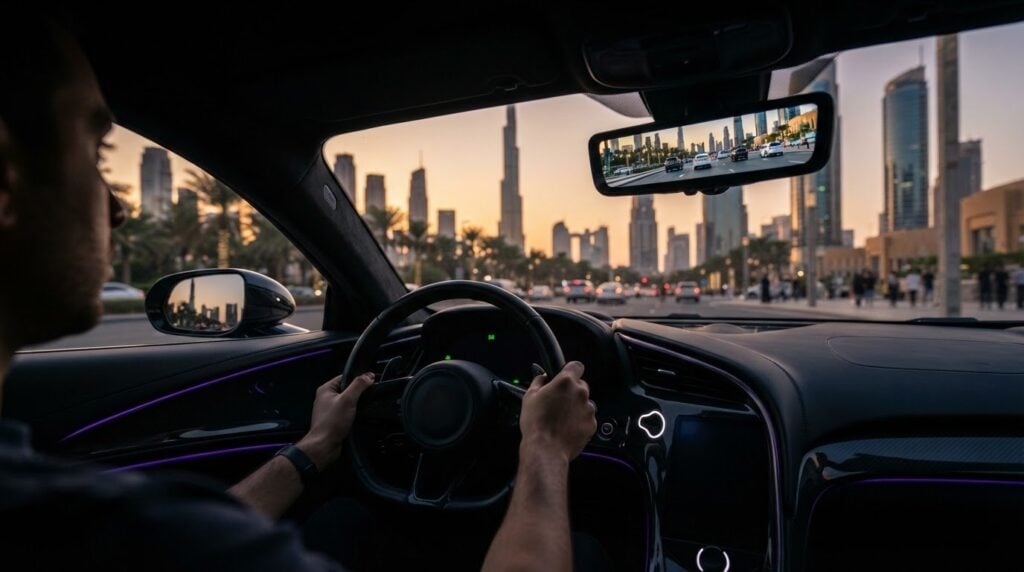
A digital rear view is useful only when it’s set up before the drive. In supercars with a narrow rear window or an engine cover that blocks the view, digital rear view mirror adjustment in low rear visibility supercars can help you frame a clearer image. Rushed screen changes, however, can create a new distraction.
It’s easy to expect the camera to solve the rear-visibility problem. Start while parked: check the displayed view, adjust its position or brightness using the vehicle’s controls, and make sure the image is clear and comfortable to read. If the controls are unfamiliar, ask for a model-specific walkthrough before setting off.
This guide covers how to prepare a useful rear image, what to check if it looks dim, glaring, obstructed, or poorly framed, and where a digital mirror’s limits are. It also explains how to use the display alongside side mirrors and appropriate shoulder checks, so it supports your awareness rather than replacing it.
Key Takeaways
- Understand why supercar design can restrict the direct rear view and how a camera display changes what you see.
- Follow a safe, manual-first sequence for digital rear view mirror adjustment in low rear visibility supercars, starting with a clear, unobstructed camera lens.
- Compare camera and reflective views, keeping in mind how framing, lighting, obstructions, and familiarity can affect each.
- Check visibility before driving, then continue using side mirrors and checking your surroundings before manoeuvres.
- When renting a supercar, ask the rental contact to identify the controls and explain that vehicle’s mirror operation.
Why Low Rear Visibility Makes Digital Mirror Setup Matter in Supercars
A digital rear-view mirror is a cabin display showing live footage from a rear-facing camera. A conventional mirror reflects light from behind the car, while a digital system displays an electronically captured image. The display can be useful when the cabin mirror’s line of sight is blocked, but it’s important to understand what the camera captures and how that framing differs from a reflection.
That difference matters in a supercar. A low roofline, compact rear glass, engine cover, or sculpted bodywork may limit the view through the cabin. A camera can show areas that aren’t visible through the rear window, but its viewpoint and field of view depend on its position. The image may also be processed or flipped to work like a mirror. This overview of automotive camera systems explains common camera-view principles.
What a digital rear-view mirror shows
The display shows the camera’s view, not a reflection of the cabin behind you. Camera placement, framing, and available display modes vary by manufacturer and model. Some systems may switch between a camera image and a conventional reflective view; others work differently. Don’t assume the controls are universal. While parked, locate the mirror control or mode selector and check the owner manual before changing settings.
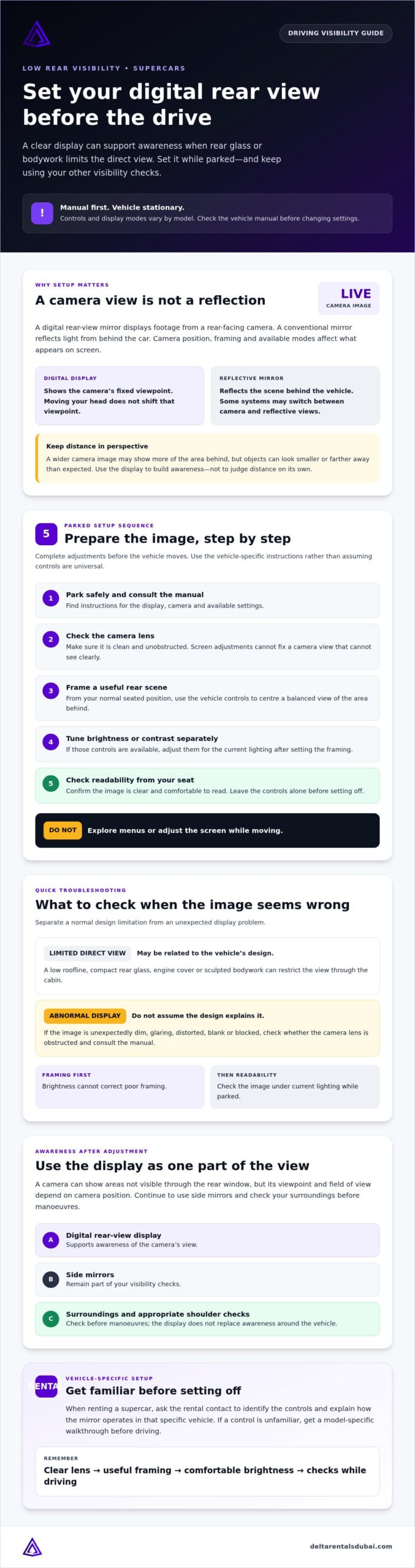
For digital rear view mirror adjustment in low rear visibility supercars, remember that the camera’s fixed viewpoint won’t shift like a reflective view when you move your head. A wider image may show more of the area behind the car, but objects can look smaller or farther away than expected. Use the image to build awareness, not to judge distance on its own.
Why a supercar can have a restricted rear view
Design features such as a low roofline and aerodynamic rear bodywork can leave limited space for rear glass. An engine cover or other bodywork may further narrow the direct view. This can be a normal design limitation, rather than a camera fault.
Keep the two situations separate. A narrow direct view may be normal for the vehicle. If a digital display is unexpectedly dark, distorted, blank, or blocked, check whether the camera lens is obstructed and consult the manual. Don’t assume the vehicle’s design explains an abnormal image. Mirror equipment and controls vary, so confirm the setup for the specific car before driving.
How to Adjust a Digital Rear-View Mirror Before Driving
Set the display while the vehicle is stationary, with enough time to check the image without rushing. Controls vary by model, so use the vehicle manual rather than relying on a familiar button layout.
Complete mirror adjustments before the vehicle moves.
- Park safely and consult the manual. Choose a safe, stationary position, then find the instructions for the mirror display, camera, and available settings.
- Check the camera lens. Make sure it’s clean and unobstructed before changing settings. If the lens is blocked or the image looks abnormal, address that first. Display adjustments won’t fix a camera view that can’t see clearly.
- Set the image framing. Use the vehicle-specific controls to centre a useful view of the rear scene. Make changes from your normal driving position, not while leaning toward the screen.
- Review brightness or contrast separately. If the system offers these controls, adjust them for the current lighting after framing the image. Not every vehicle has the same options.
- Check the result from your seated position. Confirm the view is clear and comfortable to read, then leave the controls alone before setting off.
Set the displayed rear scene
Aim for a balanced view of the area behind the vehicle, rather than framing the image around a particular button or screen edge. Follow the manual when using a camera-view or display-mode selector. Settle into your usual driving posture before judging the framing, since your seating position affects how comfortably you can read the screen. Controls differ by vehicle, so avoid relying on exact measurements or a universal button sequence.
Tune brightness and reduce distractions
Brightness can’t correct poor framing. First position the rear scene usefully, then adjust brightness or contrast only if those controls are available. Check readability under the current lighting while the car remains parked. The display should be easy to read without drawing your attention away from driving. Don’t explore menus or adjust the screen while moving.
If you’re renting, ask the rental contact to point out the controls and explain how the mirror works in that specific vehicle. For help with a rental vehicle, you can ask about vehicle control orientation. A careful digital rear view mirror adjustment in low rear visibility supercars starts with a clear camera view, sensible framing, and settings confirmed before the drive.
Digital Mirror or Conventional Mirror: What Should You Check?
A camera display and a reflective mirror present the rear view differently. Neither gives a complete picture of surrounding traffic, and neither is always better. The useful view depends on the vehicle’s equipment, lighting, camera condition, and how confidently you can interpret the image. During digital rear view mirror adjustment in low rear visibility supercars, check how the image behaves instead of assuming the screen shows everything you need.
| Check | Digital camera view | Conventional reflective view |
|---|---|---|
| Framing consistency | The view comes from a fixed camera position, so the displayed scene may remain stable as your head moves. | The view depends on the mirror angle and your position in the seat. |
| Lighting sensitivity | Image clarity can vary with lighting and display settings. | Reflected brightness and glare can affect visibility. |
| Possible obstruction | A dirty or blocked camera lens can limit the image. | Rear glass, interior objects, or the mirror’s angle can restrict the reflection. |
| Driver familiarity | Requires comfort with interpreting a screen image and its perspective. | May feel more intuitive to drivers accustomed to a direct reflection. |
| Key limitation | Shows only the camera’s field of view and depends on a usable image. | Can be limited by the cabin’s sightline and available rear glass. |
How to judge whether the camera image is usable
While parked, check that the image is clear, stable, and shows an unobstructed area behind the vehicle. Notice whether it looks unusually blurred, flickers, appears very dark, or seems delayed. These signs don’t identify the cause on their own. If the view remains unclear, stop safely and consult the vehicle instructions. If it’s a rental, contact the rental representative for model-specific guidance.
What the display cannot tell you
A rear-facing camera doesn’t show every area beside the vehicle or cover every blind spot. Its perspective may also make distance or speed harder to judge, particularly if you’re unfamiliar with the display. Treat the image as one useful view, not a complete picture of traffic. Continue using side mirrors and direct observation before manoeuvres, and follow the vehicle’s instructions for its mirror system.
Where both are available, use the camera and reflective mirror as complementary sources. Check each view in the conditions you’re driving in, and don’t rely on either one alone to confirm that the area around the car is clear.
Low Rear Visibility Driving: Checks to Make After Adjustment
A clear screen is only one part of a useful rear view. Before moving, check that the image, mirrors, and seating position work together. In a supercar with restricted rear glass, a camera can add helpful context, but it can’t show every area around the vehicle.
Check the full view before moving
Make these checks while the vehicle is stationary. Follow the owner manual for model-specific guidance, and keep any final adjustments brief and deliberate.
- Camera image: Confirm it looks clear and stable, and that the lens and useful rear view aren’t blocked by dirt, passengers, or objects.
- Side mirrors: Set both to give you a useful view along the sides of the vehicle. Don’t expect the rear display to cover those areas.
- Seating position: Sit as you normally would when driving. Check that you can see the display without leaning or changing posture.
- Surroundings: Check for nearby people, objects, or other obstructions before setting off.
A digital mirror supplements observation rather than replacing it. Before reversing, changing lanes, or turning, check your side views and surroundings as well as the display. The camera shows only its own field of view, so a clear screen doesn’t confirm that every part of the area is clear.
Respond to glare, darkness, or a poor image
Glare or darkness can make an image harder to interpret when lighting changes. Use brightness or image settings only if the vehicle provides them, and follow the manual. Don’t try to correct a difficult view through unfamiliar menus while moving.
If the display becomes distracting, unexpectedly dark, flickers, appears delayed, or otherwise seems unreliable, don’t depend on it to judge a manoeuvre or closing distance. Pause in a safe place before checking the lens or consulting the vehicle instructions. If the view remains compromised, seek help from the appropriate rental contact rather than guessing at the cause.
Good digital rear view mirror adjustment in low rear visibility supercars includes knowing when not to rely on the screen. If you’re considering a rental and want to ask about vehicle controls before setting off, ask about renting a supercar.
Preparing a Rented Supercar With Limited Rear Visibility
An unfamiliar cabin can make even simple controls less intuitive. Before setting off, ask the rental contact to identify the mirror controls and explain how that specific vehicle’s rear view works. Equipment varies, so don’t assume a supercar has a camera display, a conventional reflective mirror, or selectable modes until you’ve checked.
What to confirm at vehicle handover
Use the handover to get familiar with the controls instead of guessing once you’re on the road. Ask:
- Does the vehicle use a camera display, a conventional mirror, or a system with selectable views?
- Where are the mirror controls or mode selector, and what does each setting change?
- Where is the owner manual, or can someone explain how the mirror works?
- Can you set the seat and mirrors and check the view from your normal driving position before departure?
Confirm that the camera view, if fitted, is clear and nothing inside or outside the vehicle is blocking it. Set your seating position first, then assess the mirror view. If a control or image is unclear, ask before moving rather than experimenting in traffic.
Make the first drive feel more familiar
Before setting off, identify the rear view and any other visibility aids available in the vehicle. Take time to understand how the display is framed and how it differs from a reflection. A guide to a Porsche 911 GT3 RS rental can help you explore the rental option, but it doesn’t confirm the mirror type or controls in a particular vehicle. Verify those details at handover.
The same principle applies to digital rear view mirror adjustment in low rear visibility supercars: learn the system in the vehicle you’ll drive instead of relying on assumptions based on another model. Keep using the side mirrors and checking your surroundings, because a rear display doesn’t show every area around the car.
Delta Rentals Dubai offers premium supercar and luxury vehicle rentals. Explore Delta supercar rental options and ask which mirror equipment and controls are fitted to the specific vehicle you’re considering.
Prepare Your View Before You Set Off
A useful rear view starts with a safe setup, not hurried screen changes. Park first, check the owner manual, make sure the camera lens is clear, then set the image from your normal driving position. Adjust brightness only if the vehicle provides that control, and confirm the display is easy to read before moving.
A camera view and a reflective mirror have different limitations. A digital display shows only what its camera captures, so keep checking your side mirrors and surroundings before manoeuvres. If the image becomes unclear or distracting, stop safely and consult the vehicle instructions or rental contact. Careful digital rear view mirror adjustment in low rear visibility supercars supports awareness but never replaces it.
Delta Rentals Dubai offers premium supercar and luxury vehicle rentals, including Porsche 911 GT3 RS rentals. Mirror equipment and controls can vary by vehicle, so ask for a model-specific walkthrough before setting off. Ask about a supercar rental and its vehicle controls, then take time to get comfortable with your view before driving.
Frequently Asked Questions
How do you adjust a digital rear-view mirror in a supercar?
Adjust it while parked, following the vehicle manual. First check that the camera lens is clean and unobstructed. Sit in your normal driving position, then use the vehicle-specific controls to frame a useful rear scene. If brightness or contrast settings are available, adjust them separately for the current lighting. For digital rear view mirror adjustment in low rear visibility supercars, finish by checking side mirrors and surroundings before moving.
Can a digital rear-view mirror eliminate blind spots?
No. A digital rear-view mirror shows only the scene captured by its rear-facing camera, so it can’t show every area beside the vehicle or cover all blind spots. Camera placement and field of view vary by model. Use the display alongside side mirrors and direct observation, especially before changing lanes, turning, or reversing. A clear screen doesn’t mean the entire area around the car is clear.
Why is the image in my digital rear-view mirror dark or unclear?
A dark or unclear image can have several possible causes, including lighting conditions, a dirty or obstructed camera lens, or a display issue. Check the lens and consult the vehicle manual for available image settings. Don’t guess at the cause or rely on a poor image to judge distance or a manoeuvre. If the view remains unclear, stop safely and ask the rental contact or appropriate vehicle support for guidance.
Should I adjust a digital rear-view mirror while driving?
No. Complete mirror and display adjustments while the vehicle is safely parked, and consult the owner manual if you’re unsure how the controls work. Set the image framing first, then adjust brightness or contrast only if the vehicle provides those options. If the view needs attention once you’re moving, don’t reach for menus or controls. Stop in a safe place before checking the settings or seeking assistance.
What happens if a supercar has no digital rear-view mirror?
Use the reflective rear-view mirror if fitted, along with the side mirrors and direct observation. A low roofline, compact rear glass, or rear bodywork may restrict the view, so take time to understand the vehicle’s sightlines before setting off. Adjust the available mirrors while parked and check your surroundings before manoeuvres. If you’re unfamiliar with the vehicle’s controls or visibility, consult the manual or ask the rental contact for an explanation.
Can glare affect a digital rear-view mirror?
Yes. Bright surroundings or reflections on the display can make the camera image harder to read. While parked, check whether the vehicle offers brightness or other display settings, and follow the manual when using them. Don’t make unfamiliar adjustments while driving. If glare still makes the image distracting or difficult to interpret, pause safely and use the other available mirrors and observations rather than depending on an unclear screen.
How should I prepare a rented supercar with restricted rear visibility?
Before departure, ask the rental contact whether the vehicle has a camera display, a conventional mirror, or selectable modes, and request an explanation of the controls. Locate the owner manual, set your seat and available mirrors, and check the view from your normal driving position while parked. If a camera is fitted, confirm its lens is unobstructed. Ask about that specific vehicle rather than assuming its equipment based on the model.