

The most aggressive setting isn’t automatically the right one for a rental. If you’re looking for Porsche 911 GT3 RS drive modes explained for renters, first confirm which car you’ll be driving. Its model year and equipment affect which controls and settings are fitted.
The steering-wheel dials may feel unfamiliar if you haven’t driven this model before. On some GT3 RS configurations, they adjust individual chassis or traction systems rather than simply selecting a general road-driving mode. Changing a setting without understanding it can make the car respond differently than you expect.
This guide explains the difference between drive modes and adjustable systems, what to ask about the rental before setting off, and how to check the vehicle’s instructions. Use the controls only after confirming their function for your specific car, and plan to drive on public roads rather than treating them like a circuit. Confirm the model year, configuration, available controls, and operating instructions before driving. That way, you can focus on the car instead of guessing what each dial does.
Key Takeaways
- Drive modes and individual chassis adjustments aren’t the same thing. Knowing the difference helps you understand what a control changes.
- Porsche 911 GT3 RS drive modes explained for renters can vary by vehicle year and configuration, so check the controls fitted to your rental.
- Ask about PASM, PSM, and steering-wheel controls before changing any settings.
- Use a simple familiarisation routine: identify the controls, confirm the baseline, and consult the owner’s manual before setting off.
- Choose settings and a driving plan for public roads. The most aggressive option isn’t automatically the most suitable.
Porsche 911 GT3 RS drive modes: why renters should understand them first
A drive mode is a selection that may coordinate several vehicle responses. Separate controls can adjust particular systems without changing the broader mode. Drive modes group vehicle settings; chassis adjustments change selected systems independently. Knowing the difference helps you understand what a button or dial does before using it.
Learn the controls while the car is parked. Ask which setting to use as a starting point, what each control changes, and whether any adjustments should remain untouched during your planned public-road drive. If a label or function isn’t clear, don’t guess or rely on memory from another car.
What does a drive mode change in a performance car?
A selected mode may coordinate responses across systems, but the exact changes depend on the car’s model year and configuration. Separate controls may adjust individual systems without changing the broader mode. Don’t assume a label means the same thing across different vehicles, or that a particular setting changes the throttle, suspension, transmission, or stability systems. Check the owner’s manual for the car you’ll drive to confirm what each control does.
That’s the useful starting point for Porsche 911 GT3 RS drive modes explained for renters: understand a control’s function before deciding whether to use it.
Why does the exact GT3 RS matter to a renter?
The 911 has evolved across generations, and the Porsche 911 (992) GT3 RS overview offers background on the 992 generation. General information can’t confirm the equipment in a particular rental, though. Model year and configuration may affect which labels, mode controls, and adjustable settings are present.
Check the actual car rather than relying on a video or guide for another year. Before confirming your rental, ask which model year and configuration is available for your dates, which controls are fitted, and where to find the owner’s manual. If a control walkthrough is available, use it to locate the controls, then check the vehicle’s manual for operating instructions.
Before setting off, confirm the baseline setting, locate the controls without changing them, and ask about anything you don’t recognise. A Porsche 911 GT3 RS rental should be an enjoyable experience, and understanding the equipment in your specific car helps you approach it with confidence.
How the GT3 RS connects drive modes with chassis and stability settings
Some GT3 RS configurations offer ways to adjust individual chassis or stability systems in addition to selecting a mode. These are separate layers of control: a broad setting may coordinate vehicle responses, while a system-specific adjustment changes one area. The controls fitted to your rental depend on its model year and configuration, so check the car and its documentation rather than assuming the layout.
What should renters know about suspension and stability controls?
Porsche Active Suspension Management (PASM) refers to the car’s electronically managed suspension damping. Damping affects how the suspension responds as the car moves over the road. Porsche Stability Management (PSM) is the stability assistance system. These are distinct systems: one concerns suspension response, while the other supports vehicle stability.
Neither system removes the need to drive smoothly or account for road conditions. Public roads can be uneven, and grip can change. Don’t disable driver aids or experiment with settings while driving. If the rental’s manual describes adjustable suspension or stability settings, check what the displayed options mean and follow its instructions.
Are individual controls the same as a drive mode?
No. Think of a mode as a broader selection and an individual control as a way to adjust one system, if that control is fitted. Some GT3 RS steering-wheel layouts have controls for adjusting chassis settings separately. Autocar’s overview of fine-tuning the GT3 RS suspension illustrates how detailed suspension adjustments can be. It’s useful background, but it doesn’t confirm that a rental has the same controls or configuration.
A mode name is only a starting point; check the individual settings fitted to the specific car. That’s central to Porsche 911 GT3 RS drive modes explained for renters. Labels, icons, and functions may differ by model year, so don’t assume a dial or button in a video matches the one in your rental. Identify each control while parked, then confirm its function in the owner’s manual or with the rental provider.
Before confirming a rental, ask which PASM and PSM controls are present and what baseline settings are recommended for your planned public-road drive. Delta Rentals Dubai offers Porsche 911 GT3 RS rental, but confirm the exact vehicle configuration and handover details directly. For a vehicle-specific enquiry, use WhatsApp to ask about the GT3 RS rental.
GT3 RS drive modes compared: what renters should understand about each setting
Mode labels aren’t universal across Porsche models, and you should confirm the rental’s model year and configuration before relying on any description. The information referenced here identifies Track as a mode on the 992-generation GT3 RS, with steering-wheel controls for adjusting chassis settings. That doesn’t confirm the year or equipment of a particular rental. Use the table to guide your questions, not as a replacement for the vehicle’s owner’s manual.
| Label or control | What to understand | What to verify |
|---|---|---|
| Track | A track-oriented setting associated with adjusting chassis systems. It isn’t a recommendation for ordinary public-road driving. | Confirm that this label and its described function apply to the specific rental car and check the manual before using it. |
| Other mode names | No other mode label can be confirmed for the exact rental vehicle from the available details. | Ask which modes the car has. Don’t assume labels such as Normal, Sport, or Sport Plus are fitted. |
What does each confirmed mode mean in everyday terms?
For a renter, Track indicates a track-focused setting. It doesn’t mean the car is better suited to a road journey. The information available describes chassis adjustment through steering-wheel controls, but you must check the rental car’s manual for the exact controls and functions. Don’t assume a setting changes a particular system unless the vehicle documentation confirms it.
This is the practical point behind Porsche 911 GT3 RS drive modes explained for renters: rely only on labels and functions confirmed for your car. A video or guide for another model year may show a different layout.
Which setting should a renter choose for a first drive?
Start with the baseline the owner’s manual identifies for road use, if it specifies one. If the guidance isn’t clear, ask the rental provider before selecting unfamiliar settings. Have the controls explained while parked, and don’t change them on the move just to see what happens.
Choose based on the conditions, not the most dramatic label. Traffic, road surface, weather, and your familiarity with the car all matter. An aggressive or track-oriented setting isn’t automatically the right choice. Before confirming your rental, ask which modes and adjustments are fitted to that vehicle, then check the manual for operating instructions.
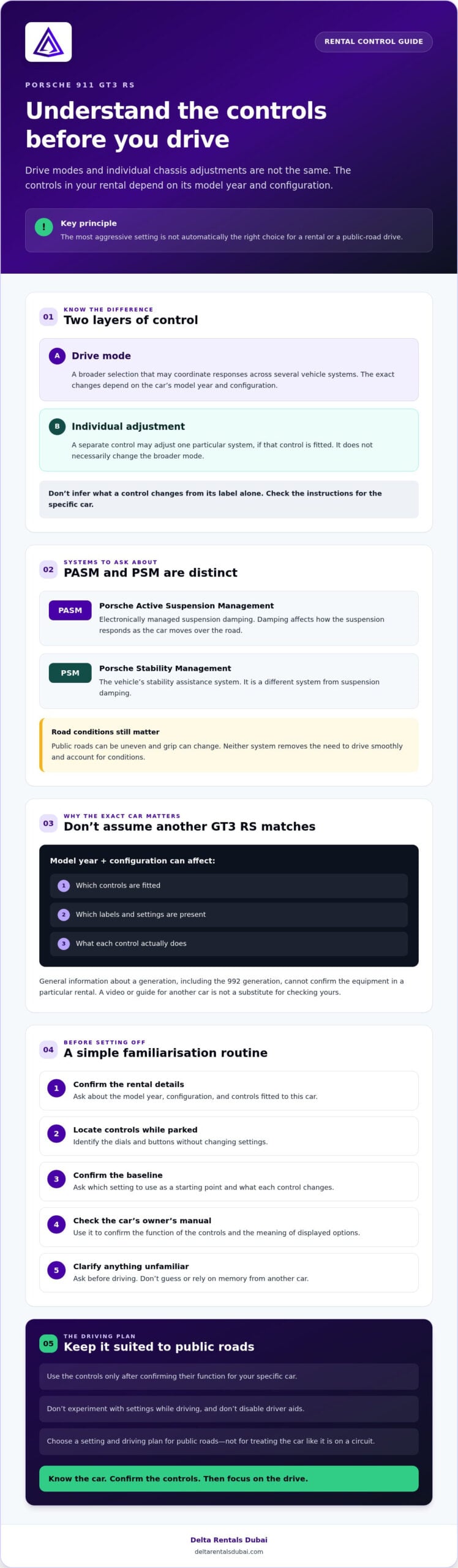
A renter’s step-by-step GT3 RS control familiarisation before setting off
A calm start makes the car easier to understand. Before driving, follow a short routine and ask questions about the specific GT3 RS rather than assuming another model year has the same controls. Learn the controls before experimenting with performance settings.
- Identify the controls. While parked, locate the mode selector, steering-wheel controls, and warning indicators. Ask what each unfamiliar label or icon does. Don’t press controls just to see what happens.
- Confirm the baseline. Ask which setting the owner’s manual recommends for ordinary road use, if it identifies one. Confirm whether any individual adjustments are active and how to recognise their current positions.
- Review vehicle-specific guidance. Consult the car’s owner’s manual or ask for an explanation that matches its model year and configuration. If the instructions are unclear, resolve that before moving off.
- Adjust cautiously, if appropriate. Change settings only when the manual permits it and you understand the effect. Ask which settings suit your planned public-road use. Leave track-oriented adjustments alone unless the vehicle guidance and your intended use specifically support them.
What should you ask during vehicle handover?
Make the conversation specific. Ask which model year and configuration you’ll receive, which drive modes and steering-wheel controls are fitted, and what the warning indicators mean. Confirm where you can consult the owner’s manual or other vehicle-specific instructions. If a control walkthrough is available, ask for it before setting off. Delta Rentals Dubai offers Porsche 911 GT3 RS rental, but confirm the exact vehicle and handover details directly.
How can you learn the controls without overcomplicating the drive?
Keep the first drive simple. Visibility, weather, traffic, road conditions, and your familiarity with a specialist performance car all affect how much attention you can give its controls. Focus on smooth, measured inputs and the road ahead. Don’t explore unfamiliar settings while driving or treat a public road as a track. Track-focused functions call for a separate discussion about the vehicle’s instructions and appropriate use.
This checklist makes Porsche 911 GT3 RS drive modes explained for renters practical: identify, confirm, review, then decide whether an adjustment is needed. To ask about the specific rental car and its controls before confirming, message Delta Rentals Dubai about the GT3 RS rental.
Renting a Porsche 911 GT3 RS: make the drive modes part of your decision
Choose a rental with the actual configuration and your planned drive in mind, rather than assumptions based on a different GT3 RS. Before booking, aim to understand which vehicle is available, what its controls do, and how the handover will work. Drive modes are one part of the decision, alongside rental terms and a realistic plan for public roads.
What should you confirm before reserving a GT3 RS?
Ask about the vehicle proposed for your dates and confirm its model year, configuration, and fitted mode or adjustment controls. Request an explanation of unfamiliar controls, and check whether the owner’s manual or other vehicle-specific guidance will be available. Confirm rental terms and handover details directly instead of assuming they match another booking or an online description.
The Porsche 911 GT3 RS rental guide is a useful companion to this explanation. Use it alongside vehicle-specific answers, not as a substitute for confirming the car you’ll receive. General descriptions can help you prepare, but the owner’s manual is the reference for that vehicle’s controls and operating instructions.
How can renters get vehicle-specific answers?
Keep your enquiry concise and specific. Include your intended dates and ask:
- Which model year and configuration is being considered for those dates?
- Which drive modes and steering-wheel adjustments are fitted?
- What baseline setting does the vehicle’s manual identify for ordinary road use?
- What rental terms and handover details should you know before confirming?
Delta Rentals Dubai offers Porsche 911 GT3 RS rental, but exact availability, vehicle details, and handover arrangements require direct confirmation. You can review Delta Rentals Dubai vehicle information and verify any remaining questions with the rental provider. Aim to understand the controls before setting off, then choose a driving plan suited to your experience and road conditions. That’s the practical takeaway from Porsche 911 GT3 RS drive modes explained for renters: confirm the car, understand its equipment, and don’t let track-focused settings dictate a public-road drive.
Ready to check the vehicle details for your dates? Ask about the Porsche 911 GT3 RS rental.
Confirm the car, then enjoy the drive
The key to Porsche 911 GT3 RS drive modes explained for renters is simple: a mode name doesn’t tell the whole story. Broad drive modes and individual chassis adjustments may be separate controls, and the exact labels and equipment depend on the specific car.
Before confirming, ask about the vehicle’s model year, configuration, fitted controls, rental terms, and handover details. Check unfamiliar functions against that car’s owner’s manual, and choose a measured public-road driving plan rather than chasing the most aggressive setting. Knowing what’s fitted helps you get behind the wheel with confidence.
Delta Rentals Dubai offers Porsche 911 GT3 RS rental to customers across the UAE. Availability and vehicle details for your dates need direct confirmation. Ask about renting the Porsche 911 GT3 RS and include your dates and questions about the specific vehicle. With the right details confirmed, you can focus on a composed, rewarding drive.
Frequently Asked Questions
What drive modes does the Porsche 911 GT3 RS have?
Mode names and available settings depend on the GT3 RS model year and configuration. The 992-generation information referenced in this guide identifies Track mode, but that doesn’t confirm which modes are fitted to a particular rental. Don’t assume it has Normal, Sport, or Sport Plus. Ask about the exact vehicle and check its owner’s manual before relying on a mode label or online guide.
What does Track mode do on a Porsche 911 GT3 RS?
Track mode is track-oriented, and the 992-generation GT3 RS information describes steering-wheel controls for adjusting selected chassis settings. Confirm the exact functions and control layout in the rental vehicle’s manual. Track-focused settings aren’t a recommendation for public-road driving. Before using an unfamiliar adjustment, ask what it changes and whether the vehicle’s instructions permit its use in your intended setting.
Can renters change GT3 RS settings while driving?
Follow the instructions for the specific vehicle. The owner’s manual should explain whether a setting can be changed while moving and how to operate its controls. If you can’t confirm that, don’t adjust it while driving. Learn the controls while parked, ask the rental provider about anything unclear, and keep your attention on traffic, visibility, and road conditions instead of experimenting with performance settings.
What is the difference between a drive mode and a suspension setting?
A drive mode is a broader selection that may coordinate vehicle responses, while a suspension setting adjusts the suspension system specifically. Available controls and functions vary by model year and configuration. A mode label alone doesn’t tell you which individual adjustments are active. Check the rental car’s manual to understand its controls, and ask for clarification before changing anything unfamiliar.
Is the Porsche 911 GT3 RS suitable for a first-time supercar renter?
It may suit a first-time renter who is comfortable with the vehicle, understands its controls, and plans a measured drive, but there’s no universal answer. Consider your driving experience, familiarity with performance cars, and the conditions you expect to encounter. Before booking, confirm the rental requirements and ask what vehicle-specific guidance is available. Take time to understand the controls before setting off.
Do GT3 RS drive modes make public-road driving safe?
No drive mode can guarantee safety or override a driver’s responsibility to respond to the road. Traffic, visibility, weather, road surface, and your experience still matter. Treat track-oriented functions as distinct from ordinary public-road use, and don’t assume a mode compensates for conditions or driving decisions. Follow the owner’s manual, use measured inputs, and ask the rental provider about unfamiliar controls before driving.
What should I ask before renting a Porsche 911 GT3 RS?
Ask which model year and configuration is available for your dates, which modes and adjustable controls it has, and where you can consult its owner’s manual. Confirm rental terms and handover details directly rather than making assumptions. For Porsche 911 GT3 RS drive modes explained for renters, vehicle-specific answers matter most: instructions for another year or configuration may not match the car you’ll receive.